Clothing shop
The big question in a clothing shop: one dress comes in sizes 98, 104, 110 and three colours, so how do you keep stock right? The answer is a model. You enter the dress once, tick its sizes and colours, and every size and colour is counted separately with its own barcode, price and stock.
Set up once
Section titled “Set up once”-
Switch on Sozlamalar (Settings) → Imkoniyatlar (Features) → O'lcham va ranglar (Sizes and colours) → Mahsulotlar o'lcham va rangga bo'linadi (Products come in sizes and colours).
-
Tap O'lcham va ranglarni sozlash (Set up sizes and colours). Ready-made lists are there:
- Bo'y (sm) (height, cm): 50, 56, 62 ... 98, 104, 110 ... 164 (children's clothing);
- Yosh (age): 0-3 months ... 13-14 years (babies and children);
- O'lcham (S-XL): XXS ... 3XL (adults);
- Rang (colour): 15 colours.
If a size you need is missing (for example adult sizes 44, 46, 48), tap Yangi ro'yxat (New list) → name it O'lcham (44-60), type O'lcham (Size) → type the values separated by spaces:
44 46 48 50 52 54→ Qo'shish (Add) → Saqlash (Save). -
Switch on Sozlamalar → Imkoniyatlar → Yorliq (narx etiketkasi) (Labels) and pick a label size. Clothing shops usually use 40×30 mm or 58×40 mm.
-
Sozlamalar → Bo'limlar (Categories): Dresses, Trousers, T-shirts, Jackets, School uniform, Accessories (Categories).
Your first model
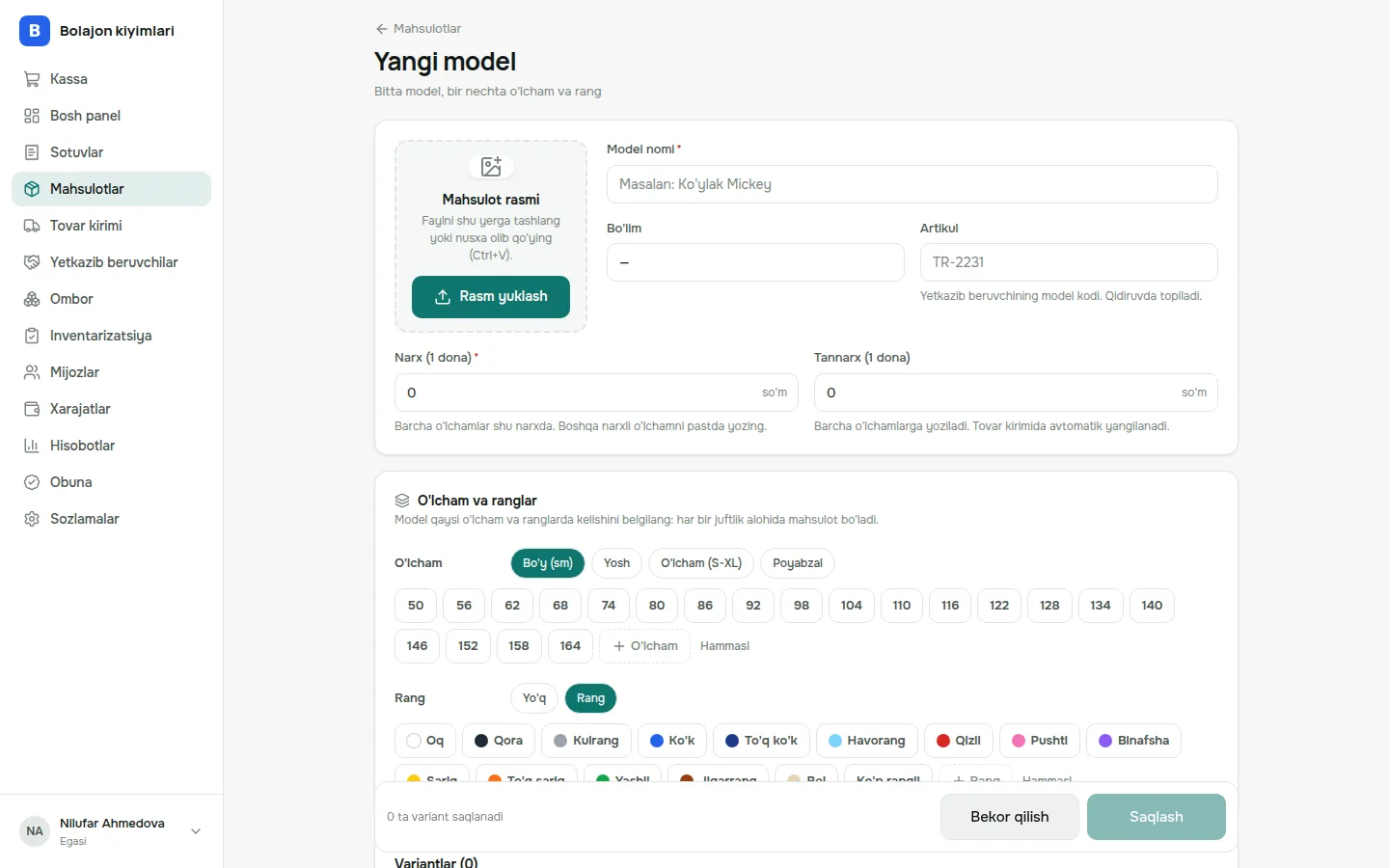
Section titled “Your first model”Example: a children's dress Ko'ylak Malika, article TR-2231, height 98-116, colours pink, purple, white. Price 145 000 so'm; sizes 110 and 116 cost 155 000 so'm.
-
Mahsulotlar (Products) → Yangi model (New model).
-
A photo, Model nomi (Model name):
Ko'ylak Malika, Bo'lim (Category): Dresses, Artikul (Article):TR-2231. -
Narx (1 dona) (Price):
145 000. Tannarx (1 dona) (Cost):85 000. -
O'lcham (Size): Bo'y (sm) → 98, 104, 110, 116. Rang (Colour): Rang → Pushti, Binafsha, Oq. Variantlar (12) (Variants) appears below.
-
O'lcham bo'yicha narx (Price by size) → 110 and 116 →
155 000→ 2 ta o'lchamga qo'yish (Apply to 2 sizes). -
Remove any combination that did not come (for example 116 white) with × on its row.
-
Type the pieces you have now in each row's stock field. If you have none, leave it empty: the goods come in with a receipt.
-
Leave Shtrix kodsizlarga do'kon kodi berilsin (Give shop codes to those without a barcode) on. Saqlash (Save).
After saving, add a photo for each colour (Rang bo'yicha rasmlar, Photos by colour): the till shows it when that colour is picked. Full guide: Sizes and colours.
Add goods with neither sizes nor colours (a belt, a bag) as ordinary products (Adding a product). For goods that only have colours (a scarf: red, blue, grey), make a model: first pick Yo'q (None) in the model's Rang row, then pick the Rang list in the O'lcham row.
When goods arrive
Section titled “When goods arrive”Suppliers usually deliver in runs: one of every size in each colour.
-
Tovar kirimi (Goods receiving) → Yangi kirim (New receipt) → pick the supplier.
-
Type
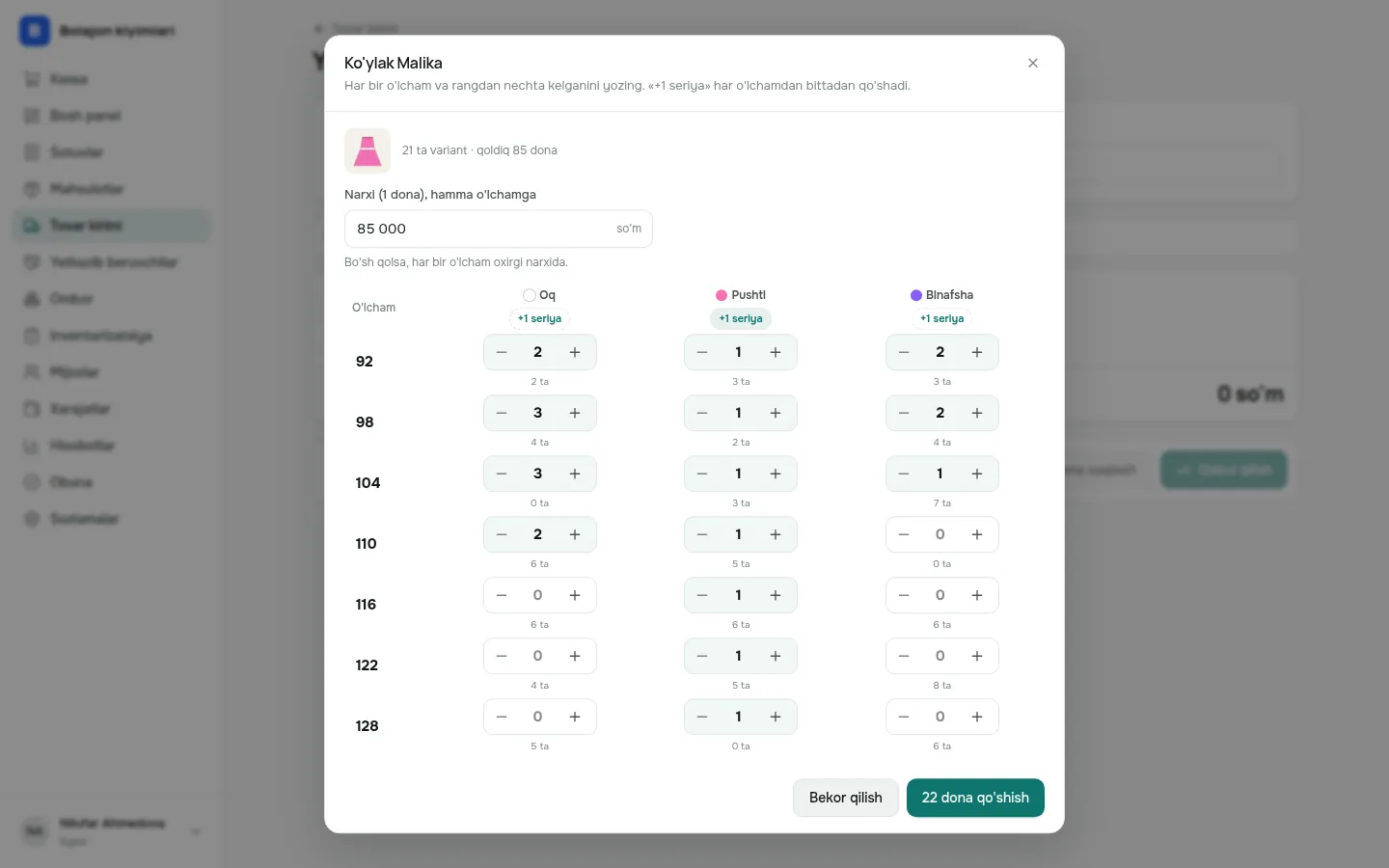
MalikaorTR-2231in the search and tap the model: the o'lchamlar jadvali (size grid) opens. -
Above each colour, tap +1 seriya (+1 run) as many times as runs arrived. Correct extra or missing pieces with − / +.
-
Narxi (1 dona), hamma o'lchamga (Price per piece, for all sizes): the supplier's price, for example
85 000. -
N dona qo'shish (Add N pieces), then Qabul qilish (Receive).
Once received, tap Yorliq (Label) on the receipt: one label for every piece that arrived is ready.
At the till
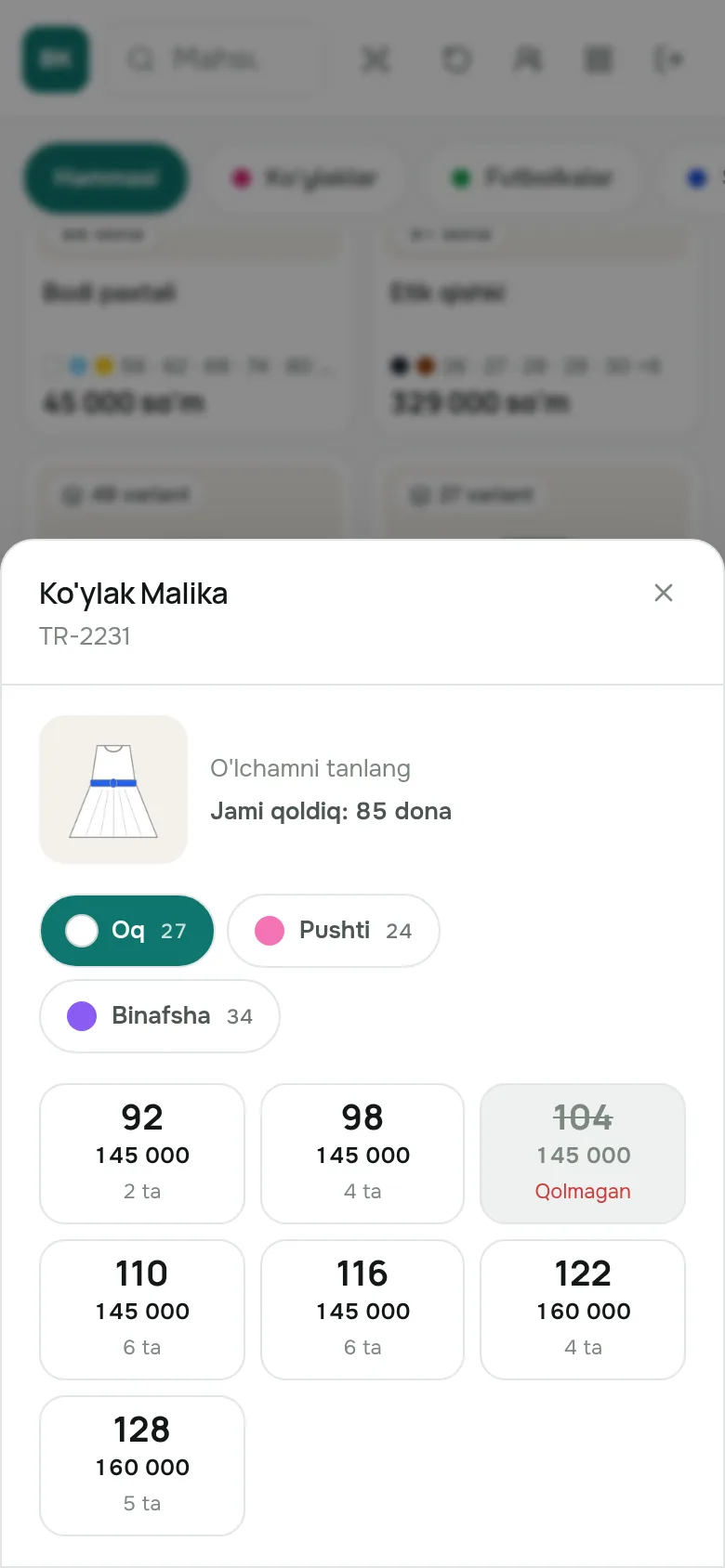
Section titled “At the till”Each model is one button at the till, showing its sizes, the price and the total stock of all sizes. The cashier:
- taps the model → picks the colour → taps the size. Each size shows 3 ta (3 left) or Qolmagan (Out of stock): "is there a 104 in pink?" is answered without walking to the stockroom;
- or scans the label: exactly that size and colour goes into the basket, nothing to pick.
The receipt reads Ko'ylak Malika (104, Pushti).
Labels
Section titled “Labels”Put a label on every piece: it shows the model's name, the size in a black box, the colour, the price and the barcode. Yorliq on the model page opens as many labels as each size has in stock; Yorliq on a receipt, as many as arrived. More: Labels.
Everyday questions
Section titled “Everyday questions”A customer wants to swap for another size. Make a return of the old size, then sell the new one. A one-tap exchange does not exist yet.
The model row says 48 in stock, but there is no 104 pink. 48 is the total of all sizes and colours. Each one's stock is in the Qoldiq: o'lcham va rang bo'yicha (Stock by size and colour) table on the model page.
A new colour arrived. Open the model, tap the new colour in the Rang row (or + Rang if it is missing), Saqlash. The new variants start at the other sizes' cost.
We lower prices at the end of the season. Change the model's price: every size without its own price follows. Then print the labels again.
Which size sells most? Every size is its own product, so reports show each on its own line. A combined report by size does not exist yet.
Can we upload from Excel with sizes and colours? Not yet: CSV import is for ordinary products. Create models in the app.