Stock
The app keeps every product's stock by itself: it goes down when sold and up when goods arrive. You never type stock by hand; you only correct it after a mistake or a loss.
What changes stock
Section titled “What changes stock”| Reason | Stock | From where |
|---|---|---|
| Kirim (Receipt) | + | Goods receiving; Hozirgi qoldiq (Current stock) on a new product with a supplier picked |
| Sotuv (Sale) | − | The till |
| Qaytarish (Return) | + | When a customer brings goods back (Returns) |
| Tuzatish (Correction) | + or − | Qoldiqni tuzatish (Correct stock, below); Hozirgi qoldiq on a new product without a supplier; CSV import |
| Hisobdan chiqarish (Write-off) | − | Broken, expired, lost goods |
| Inventarizatsiya (Stock count) | + or − | When a count is confirmed (Stock count) |
Every change is recorded with who made it and when.
The Stock page
Section titled “The Stock page”Ombor (Stock) in the menu. The owner and the manager see it.
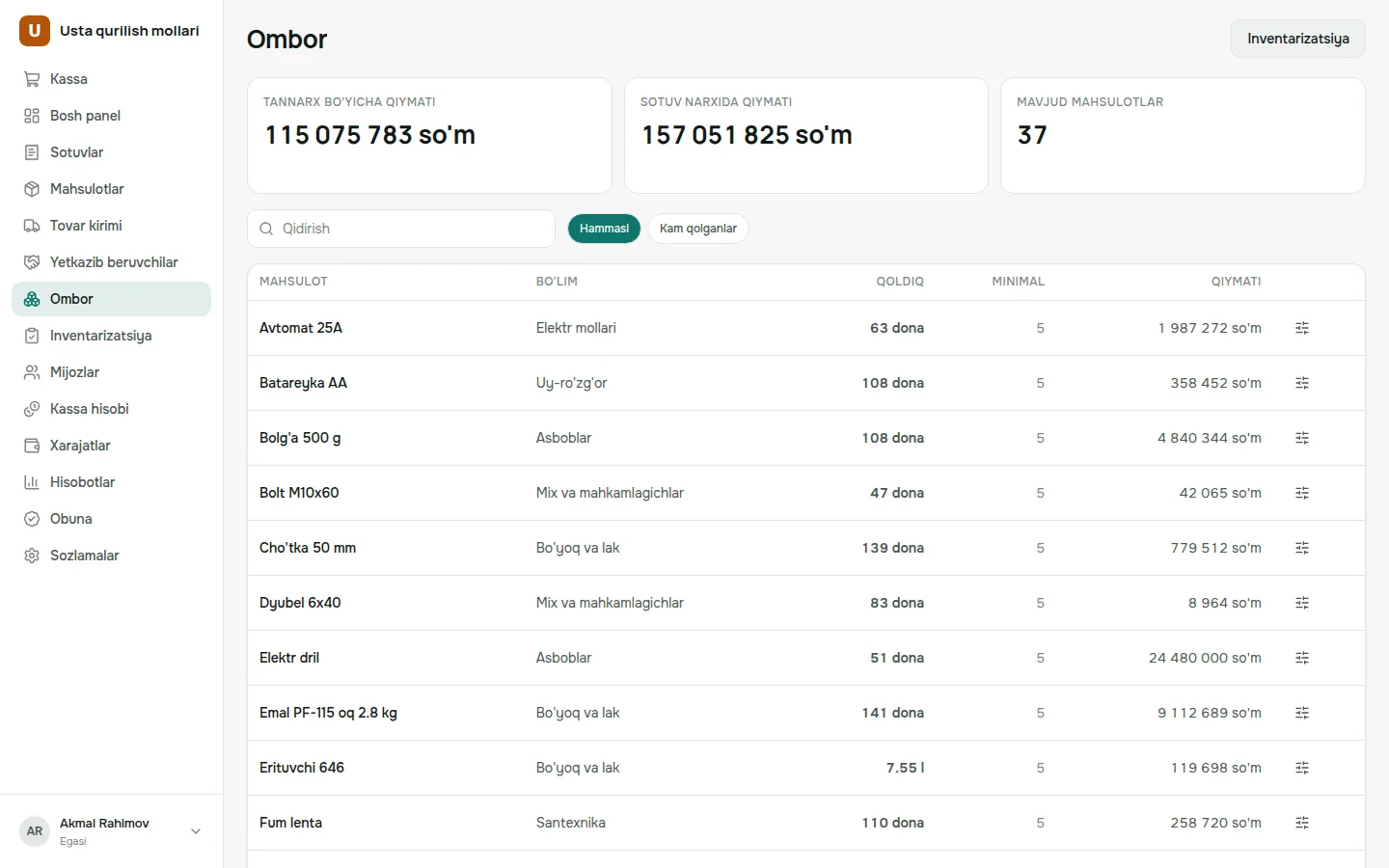
- At the top: Tannarx bo'yicha qiymati (Value at cost: what your goods are worth), Sotuv narxida qiymati (Value at sale price: what you take if everything sells) and the number of Mavjud mahsulotlar (Products in stock).
- Hammasi (All) / Kam qolganlar (Running low): running low lists only products that have a Minimal qoldiq (Minimum stock).
- Red stock: none left or below zero. Yellow: at the minimum.
- Tap a product's name to open its page.
Archived products and products that do not track stock are not shown here. A new product joins this list after its first receipt (or any other movement).
Minimum stock
Section titled “Minimum stock”Type a number in the product's Qo'shimcha sozlamalar (More settings) → Minimal qoldiq: for example 5. When stock drops to 5, the product appears under Kam qolgan and on the dashboard under Tugab qolayotganlar (Running out). On a model the number applies to every size and colour separately.
Correcting stock
Section titled “Correcting stock”If goods broke, went missing or stock was entered wrongly:
-
In Ombor, tap the adjust icon on the product's row.
-
Pick the reason:
- Hisobdan chiqarish (Write-off): the goods are gone (broken, expired, damaged). Only lowers stock.
- Tuzatish (Correction): stock was wrong. Pick Kamaytirish (Decrease) or Ko'paytirish (Increase).
-
Qancha (dona) (How many): how many to take off or add. Underneath you see Keyin qoladi: 18 dona (Left after: 18 pieces).
-
Izoh (Note): write the reason, for example "2 bottles broken". It shows in the history later.
-
Saqlash (Save).
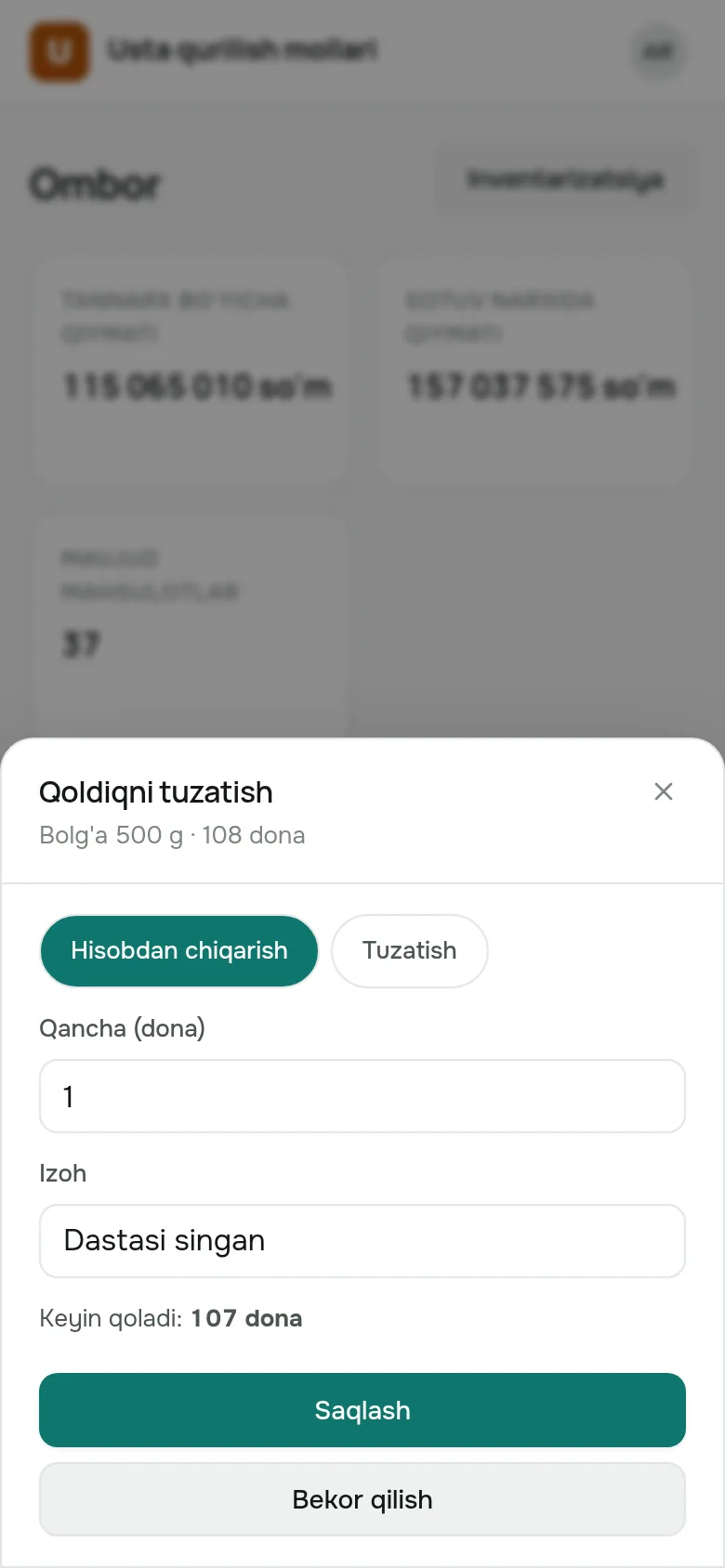
Correcting stock is allowed for the owner and the manager. To check many products at once, a stock count is easier.
Movement history
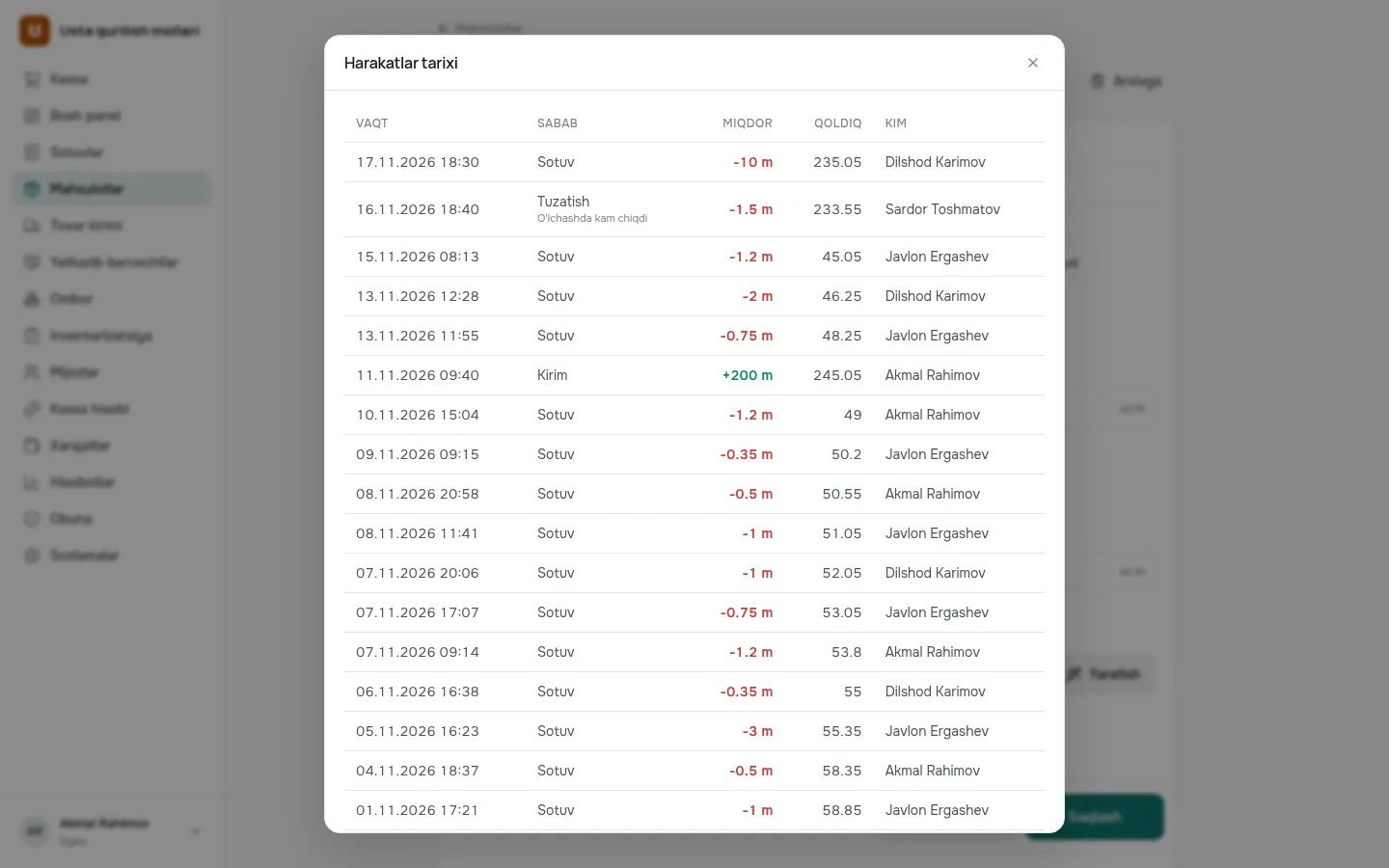
Section titled “Movement history”On a product page tap Harakatlar tarixi (Movement history). Each row shows: time, reason (Kirim, Sotuv, Qaytarish, Tuzatish, Inventarizatsiya, Hisobdan chiqarish), quantity (+ green, − red), stock after it and who did it.
On a model page, tap a size and colour's stock number to open that variant's history.
Selling when stock runs short
Section titled “Selling when stock runs short”Normally goods that are not in stock cannot be sold: the sale is refused and the message says which product is short. When goods have arrived but the receipt is not entered yet, this gets in the way. In Sozlamalar (Settings) → Do'kon (Shop) → Qoidalar (Rules), switch on Qoldiq yetmasa ham sotishga ruxsat berish (Allow selling when stock runs short): the sale goes through and stock goes below zero. Entering the receipt sets it right.
For things that have no stock at all (services, delivery), switch Qoldiqni hisoblash (Track stock) off on the product.
Questions
Section titled “Questions”Stock is below zero. Goods were sold before their receipt was entered. Enter the receipt, or count the goods and make a Tuzatish.
Can stock be shown in boxes? No, stock is always in the product's unit: piece, kg, metre (Box and piece).
Does the cashier see stock? A cashier does not see the Ombor page, but every product button at the till shows its stock.
Does a write-off affect profit? Written-off goods come off stock and off the stock value. Profit in the reports is worked out from sales, so a write-off does not change it. You see losses in the product's Harakatlar tarixi.