Features
A new shop starts as a plain till. You switch on extra features yourself when you need them: Sozlamalar → Imkoniyatlar (Settings → Features).
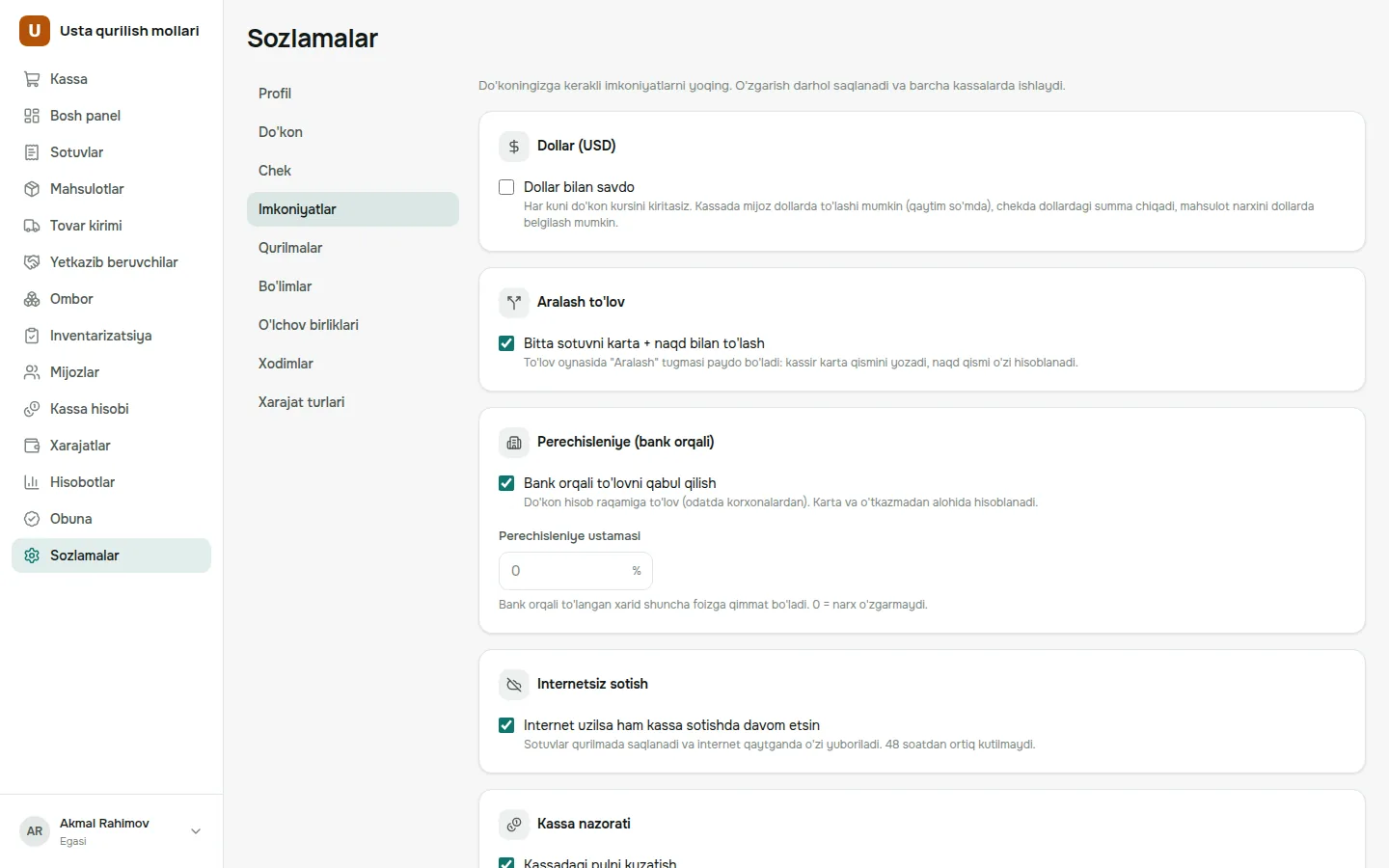
- When you press a switch, the change saves at once and works on every till of the shop. There is no separate Saqlash (Save) button.
- The shop owner and the manager switch features on. Only the owner changes the obyom rules.
- Switching a feature off does not delete what was entered: it is only hidden from the screen.
In short: which ones you need
Section titled “In short: which ones you need”| Feature | Switch it on if... | In a new shop |
|---|---|---|
| Dollar (USD) | you buy goods in dollars or customers pay in dollars | off |
| Mixed payment | customers pay one purchase partly by card and partly in cash | off |
| Bank transfer | companies pay into your bank account | off |
| Selling without the internet | almost every shop needs it | on |
| Cash control | you want to know how much cash should be in the drawer | off |
| Sizes and colours | you sell clothes, shoes or perfume | off |
| Price labels | you stick labels with a price and barcode on goods | off |
| Wholesale prices | you also sell wholesale | off |
| Seller obyom | you pay sellers a share of their sales | off |
| Price control | cashiers must not give big discounts or sell at a loss | off |
| Supplier discounts | a supplier always gives you a discount | off |
| Supplier accounts | you take goods on credit and pay later | off |
Dollar (USD)
Section titled “Dollar (USD)”Switch: Dollar bilan savdo (Trade in dollars).
What it does. You type the shop's rate every day. At the till a customer can pay in dollars (change is given in so'm). Product prices can be written in dollars: when the rate changes, their so'm price is worked out again by itself.
Who needs it. Shops that buy in dollars and whose prices follow the rate (cosmetics, electronics, building materials), or whose customers pay in dollars.
Once switched on:
- Bugungi kurs (Today's rate) and a Kursni kiritish (Enter the rate) button appear. The shop owner or the manager types the rate every morning.
- Dollar narxlarini yaxlitlash (Round dollar prices): to 1, 100, 500 or 1 000 so'm (100 by default). For example, $1.75 × 12 850 = 22 487.5 so'm; rounded to 100 it sells for 22 500 so'm.
- A payment made in dollars always prints on the receipt. To show the total in dollars too, switch on Jami summani dollarda ham ko'rsatish (Also show the total in dollars) in Sozlamalar → Chek (Settings → Receipt).
What changes for cashiers. The rate shows at the top of the till (for example 1$ = 12 850). A Dollar payment appears in the payment window. Without a rate, nobody can pay in dollars.
More: Dollar rate, Payment.
Mixed payment
Section titled “Mixed payment”Switch: Bitta sotuvni karta + naqd bilan to'lash (Pay one sale by card + cash).
What it does. An Aralash (Mixed) button appears in the payment window: the cashier types the card part and the cash part is worked out by itself.
Who needs it. Shops whose customers often pay "part by card, the rest in cash".
What changes for cashiers. A new Aralash button in the payment window. More: Payment.
Bank transfer (perechisleniye)
Section titled “Bank transfer (perechisleniye)”Switch: Bank orqali to'lovni qabul qilish (Accept payment through the bank).
What it does. You take payments into the shop's bank account (usually from companies). They are counted apart from card and transfer: the dashboard and reports have their own line for them.
Perechisleniye ustamasi (Bank transfer markup). A purchase paid through the bank costs that many percent more. For example, with 5% a 1 000 000 so'm purchase costs 1 050 000 so'm by bank. With 0, the price does not change.
Who needs it. Shops where companies, schools or builders pay from their bank account.
What changes for cashiers. Perechisleniye appears in the payment window. With a markup, the whole amount must be paid through the bank.
Selling without the internet
Section titled “Selling without the internet”Switch: Internet uzilsa ham kassa sotishda davom etsin (Keep selling when the internet drops). On in a new shop.
What it does. When the internet drops, the till keeps selling. Sales are kept on the device itself and sent by themselves when the internet is back. A sale does not wait longer than 48 hours: after that the till stops selling offline.
Who needs it. Almost every shop. Switched off, the till does not sell at all while there is no internet.
What changes for cashiers. When on, an Internet yo'q (No internet) note shows at the top of the till when the internet drops, and the till keeps working. When off, the till says "Internet yo'q, internetsiz sotish esa o'chirilgan" (No internet, and offline selling is off) and does not sell.
More: Working offline.
Cash control
Section titled “Cash control”Switch: Kassadagi pulni kuzatish (Track the cash in the drawer).
What it does. Always shows how much cash should be in the drawer right now. You record money the owner takes (not an expense) and money paid to suppliers, and at the end of the day you count the drawer and see the difference. It never stops selling.
Who needs it. Shops where someone else works the till and the money is counted in the evening.
Once switched on. A Kassa hisobi (Cash control) page appears in the menu and a Kassada bo'lishi kerak (Should be in the drawer) strip appears on the dashboard. The Kassa hisobini ochish (Open cash control) button opens that page.
What changes for cashiers. Nothing. Only the owner and the manager see the Kassa hisobi page.
More: Cash control.
Sizes and colours
Section titled “Sizes and colours”Switch: Mahsulotlar o'lcham va rangga bo'linadi (Products come in sizes and colours).
What it does. One model comes in several sizes and colours. Each size and colour has its own barcode, price and stock. For example, "Bolalar ko'ylagi" (children's dress) in sizes 92, 98, 104, in blue and pink.
Who needs it. Clothing, shoe and perfume shops.
Once switched on. An O'lcham va ranglar (Sizes and colours) section appears in Sozlamalar (the O'lcham va ranglarni sozlash, Set up sizes and colours, button opens it too). The first time, ready lists are added: height, age, S-XL, shoe sizes and colours.
What changes for cashiers. At the till they tap the model, then pick a size. When a barcode is scanned, that exact size goes straight into the basket.
More: Sizes and colours.
Price labels
Section titled “Price labels”Switch: Mahsulotlarga yorliq chop etish (Print labels for products).
What it does. A Yorliq (Label) button appears on the Mahsulotlar (Products) page, on the product card and on a received Tovar kirimi (Goods receiving). It prints a label with the product's name, price and barcode.
Yorliq o'lchami (Label size). Pick the roll size of your label printer: 58×40 mm, 58×30 mm, 40×30 mm (the default), 30×20 mm or A4 varaq (24 ta) (A4 sheet, 24). The A4 sheet is for an ordinary printer: 24 stickers on one sheet.
Who needs it. Shops that stick prices on goods or print their own barcodes.
What changes for cashiers. Nothing changes on the till screen. A cashier can print labels from a received goods delivery. From the Mahsulotlar page, labels are printed by staff allowed to work with products.
More: Price labels, Receipt printer.
Wholesale prices
Section titled “Wholesale prices”Switch: Mahsulotlarga ulgurji narx qo'shish (Add a wholesale price to products).
What it does. Every product gets a wholesale price besides the retail one. A Chakana / Ulgurji (Retail / Wholesale) switch appears on the till. Picking a customer marked Ulgurji mijoz (Wholesale customer) moves the prices to wholesale by itself. A product without a wholesale price sells at its retail price in a wholesale sale too.
Kassada ikkala narxni ko'rsatish (Show both prices on the till). This switch is on as soon as wholesale prices are on. The till's product cards show the wholesale price next to the retail price, so the seller can tell the customer both. Switch it off if you do not need it.
Who needs it. Shops that sell wholesale as well as retail (household goods, building materials, groceries).
More: Prices.
Seller obyom
Section titled “Seller obyom”Switch: Sotuvchilar obyomini hisoblash (Calculate sellers' obyom). Only the shop owner can change it: the manager sees the switch but cannot press it.
What it does. Works out each seller's obyom. Low-markup goods and credit not yet paid are taken out of revenue. Credit money is added when it is paid later.
Eng past ustama, % (Lowest markup, %). Goods sold at this markup or less do not count. 3% in a new shop.
Who needs it. Shops that pay sellers a monthly percentage of their sales.
What changes for cashiers. Nothing. The owner and the manager see obyom.
More: Sellers and obyom.
Price control
Section titled “Price control”Block name: Narx nazorati (zarar va ortiqcha chegirma) (Price control: losses and too-big discounts). What should the app do when a cashier gives too big a discount or a product sells below the lowest allowed price? There are three choices:
| Choice | What happens |
|---|---|
| O'chiq (Off) | Nothing is checked. |
| Ogohlantirish (Warn) | The cashier sees the reason and confirms the sale. The sale is marked as confirmed. |
| Taqiqlash (Block) | The cashier cannot sell alone: the owner or the manager approves with their own PIN. |
Eng katta chegirma (Largest discount). The discount on each product (together with its share of the basket discount) may not exceed this percent. With 0 there is no limit. This field appears once Ogohlantirish or Taqiqlash is chosen.
Which price is the lowest:
- With wholesale prices off: the cost. Selling below cost with a discount counts as a loss.
- With wholesale prices on: on a retail sale, the wholesale price (or the cost if there is none); on a wholesale sale, the cost. The wholesale price is only for wholesale customers; any other customer needs approval.
- If a product has an Eng past narx (Lowest price), it is a limit on retail sales too.
Who needs it. Shops where someone else works the till and discounts must be kept in check.
What changes for cashiers. When a sale breaks the rule, a window opens: Tuzatish (Fix), Baribir sotish (Sell anyway, with Ogohlantirish) or Ruxsat so'rash (Ask for approval, with Taqiqlash). The cashier never sees the cost itself.
When the owner or the manager sells themselves, they do not need approval even with Taqiqlash: they see the reason in the window and press Baribir sotish.
More: Discounts and price control.
Supplier discounts
Section titled “Supplier discounts”Switch: Yetkazib beruvchilarga umumiy chegirma (A standing discount from suppliers).
What it does. A supplier gets a discount once (for example 5% or 10%). On every delivery from them the discount comes off each line by itself. A product linked to that supplier has its cost worked out with the discount.
Who needs it. Shops whose supplier always sells below its price list (electrical goods, plumbing and the like).
What changes for cashiers. Nothing: the discount only affects cost.
More: Suppliers.
Supplier accounts
Section titled “Supplier accounts”Switch: Yetkazib beruvchilarga qarzni yuritish (Keep track of debts to suppliers).
What it does. Every delivery received from a supplier is recorded as a debt to them, and payments reduce it. The supplier's page shows the debt, purchases, payments and history.
Who needs it. Shops that take goods on credit and pay in parts later.
What changes for cashiers. Nothing. The owner and the manager keep debts and payments.
More: Suppliers.
Questions
Section titled “Questions”Can I try a feature and switch it off later? Yes. When it is switched off, its data is not deleted, only hidden from the screen. Switch it on again and it comes back.
Why doesn't a feature I switched on show on the till? A till that is already open does not learn the new setting by itself. Reload the till page: press F5 on a computer; on a phone, close the app and open it again.
Can a cashier change features? No. Only the owner and the manager see the Imkoniyatlar section.