Returns
When a customer brings goods back, the goods go back into stock and the money is handed to the customer or put on their account. There are two ways:
- By receipt: the receipt number is known. This is the best way.
- Chekisiz qaytarish (return without a receipt): there is no receipt and nobody remembers the day it was sold.
Returns need the internet. Labels are given as the Uzbek app shows them.
Return by receipt
Section titled “Return by receipt”-
Tap Qaytarish (Return) at the top of the till screen. On a phone, a tablet or a computer with a small screen the button has no text, only its icon: an arrow turning back.
-
In the Chekni topish (find the receipt) window, type the receipt number or scan the barcode at the bottom of the receipt. Tap Topish (Find).
-
The sale opens together with the return window. Under each product it says Qaytarish mumkin (can be returned). Type the quantity coming back, or tap Hammasi (all).
-
Choose Pulni qaytarish usuli (how the money is returned): Naqd (cash), Karta (card), O'tkazma (transfer), Perechisleniye (bank transfer, when that way of paying is switched on) or Nasiya (credit, when the sale has a customer).
-
If needed, type the Sabab (reason), for example "Sifatsiz" (faulty).
-
Check the Qaytariladi (to be returned) amount at the bottom and tap Qaytarishni tasdiqlash (confirm the return).
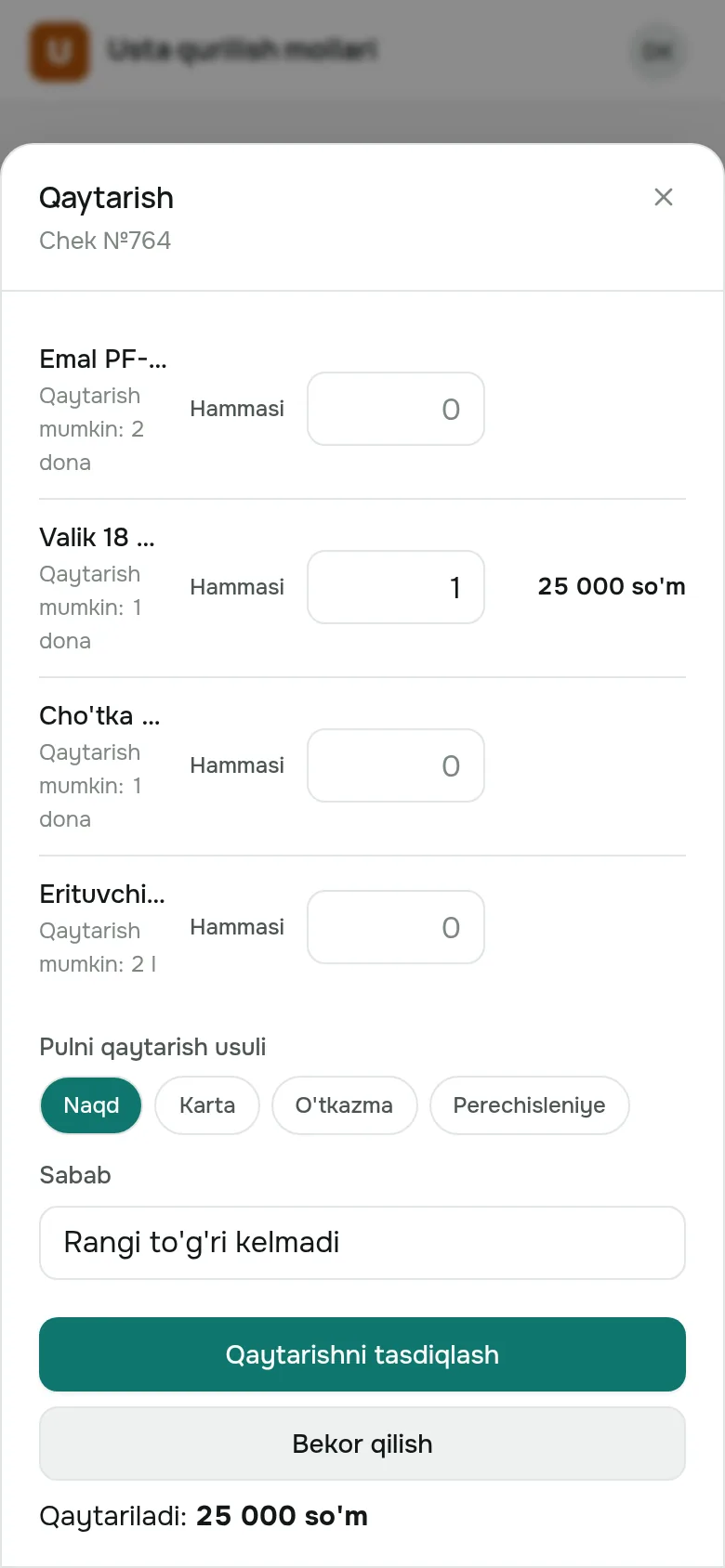
You can also open the sale from the Sotuvlar (Sales) page: find the receipt, open it and tap Qaytarish.
How much money comes back. As much as the customer paid. A discount on the whole basket is shared out between the products: a return gives back the price less its share of the discount. A bank-transfer markup comes back too. A sale paid in dollars is refunded in so'm.
One receipt can have several returns, but never more in total than was sold. The sale's status becomes Qisman qaytarilgan (partly returned) or Qaytarilgan (returned).
With Nasiya chosen, no money is handed over: the amount comes off the customer's debt. If the customer owes nothing, the amount stays as their advance.
Return without a receipt
Section titled “Return without a receipt”When the customer has no receipt and nobody remembers the day of the sale:
-
At the till tap Qaytarish. At the bottom of the window, under "Chek yo'qmi va sana esda yo'qmi?" (no receipt and no date?), tap Chekisiz qaytarish.
-
If you know the customer, tap Mijoz (ixtiyoriy) (customer, optional) and pick them. Prices then start from what this customer paid last time.
-
Type the product's name into Qaytgan tovarni qidiring (search for the returned item) and pick it. For each item, type how many and the money handed back for one unit.
-
Choose Pulni qaytarish usuli. With a customer picked, Mijoz hisobiga (to the customer's account) is offered too. If the customer owes money, Mijoz hisobiga is chosen by itself: the amount comes off their debt.
-
Choose the Sababi (reason): Chek yo'q (no receipt), Sifatsiz (faulty), Ortiqcha olingan (bought too many), Fikridan qaytdi (changed their mind), or type your own. A reason is required.
-
Tap Qaytarish. For a cashier the button reads Ruxsat so'rash (ask for approval): the owner or a manager picks their own name from the list, types their PIN and taps Ruxsat berish (approve).
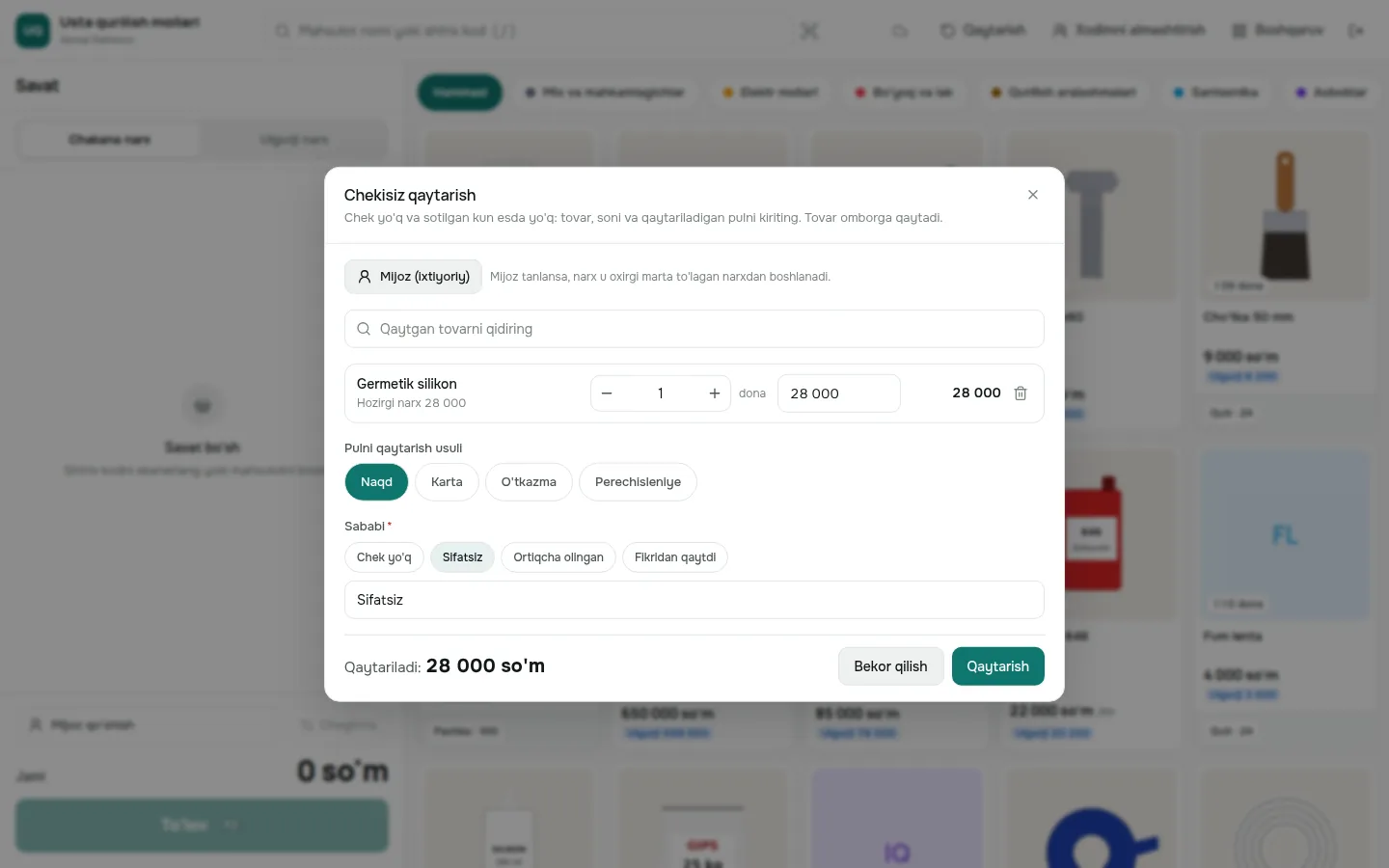
The list of approvers shows only owners and managers who have a PIN. If nobody has one, a cashier cannot make a return without a receipt. Setting a PIN: PIN.
The app does not allow more back than it should:
- no more items than were sold (to that customer, if one is picked), counting what already came back;
- no more money per unit than today's price. If the customer paid more before, up to that price.
A line that goes over shows its limit: "Ko'pi bilan ... dan" (at most ... at ...). For an item never sold it says "Bu tovar hech sotilmagan (shu mijozga)" (this item was never sold, to this customer).
Returns without a receipt are listed apart on the Sotuvlar page, in the Chekisiz qaytarishlar (returns without a receipt) card: who made the return, who approved it and why. The owner and managers see this card.
Cancelling a sale made by mistake
Section titled “Cancelling a sale made by mistake”If a sale was entered by mistake (wrong product, a receipt rung up twice), do not return it: cancel it.
-
Open the receipt on the Sotuvlar page.
-
Tap Bekor qilish (Cancel) and confirm.
The products go back into stock and any credit is removed. The sale drops out of the takings and the reports, but stays in the list as Bekor qilingan (cancelled). If the customer paid, hand the money back yourself: cancelling is not recorded as a refund.
Only the owner and managers have Bekor qilish. It works only on a sale with nothing returned yet.
Who can do what
Section titled “Who can do what”| Action | Cashier | Owner, manager |
|---|---|---|
| Return by receipt | Only their own sales | All sales |
| Return without a receipt | With an owner's or manager's PIN | On their own |
| Cancel a sale | No | Yes |
Questions
Section titled “Questions”Where do I find the receipt number? Near the top of the receipt, in the Chek line. If the receipt is lost, search the Sotuvlar page by the customer's name or the product.
A cashier cannot find another cashier's receipt. That is how it should be: a cashier returns only their own sales. Let the owner or a manager make the return.
The customer wants to swap for something else. Return the old item first, then sell the new one as a normal sale. There is no separate swap button.
Can a receipt made offline be returned? Yes, once the sale has been sent to the server. If it has not been sent yet, it says "Bu chek hali shu qurilmadan yuborilmagan. Yuborilgach qaytarish mumkin." (this receipt has not been sent from this device yet; it can be returned once sent).
Can the money be returned in dollars? No, money is always returned in so'm.
I returned a credit sale, but the debt did not go down. Naqd was left chosen: the app recorded the money as paid out in cash. A return cannot be undone. The owner or a manager fixes the debt on the customer's page with Hisobni tuzatish → Tuzatish → Qarzi kamaysin (lower the debt) and writes the reason: Customers. With Kassa hisobi (cash control) on, the drawer shows that amount as extra when you close the day: write the reason in Izoh (note).