Stock count
A stock count (Inventarizatsiya) means counting the goods on the shelf and comparing them with the app's stock. Where they differ, confirming sets stock to the counted number. Counting once a month shows theft and mistakes early.
The owner and the manager do stock counts.
Before you start
Section titled “Before you start”- Receive every delivery that has arrived in Goods receiving. A delivery that is not received shows up as a shortage.
- Pick a time with no sales: in the morning before opening or in the evening after closing.
- Count a big shop by category: a separate stock count for each category.
- Do not mix sizes and colours while counting: each one is its own line.
-
In the menu: Inventarizatsiya (or Ombor → Inventarizatsiya) → Yangi inventarizatsiya (New stock count).
-
Pick a Bo'lim (Category) or leave Barcha mahsulotlar (All products). Boshlash (Start).
-
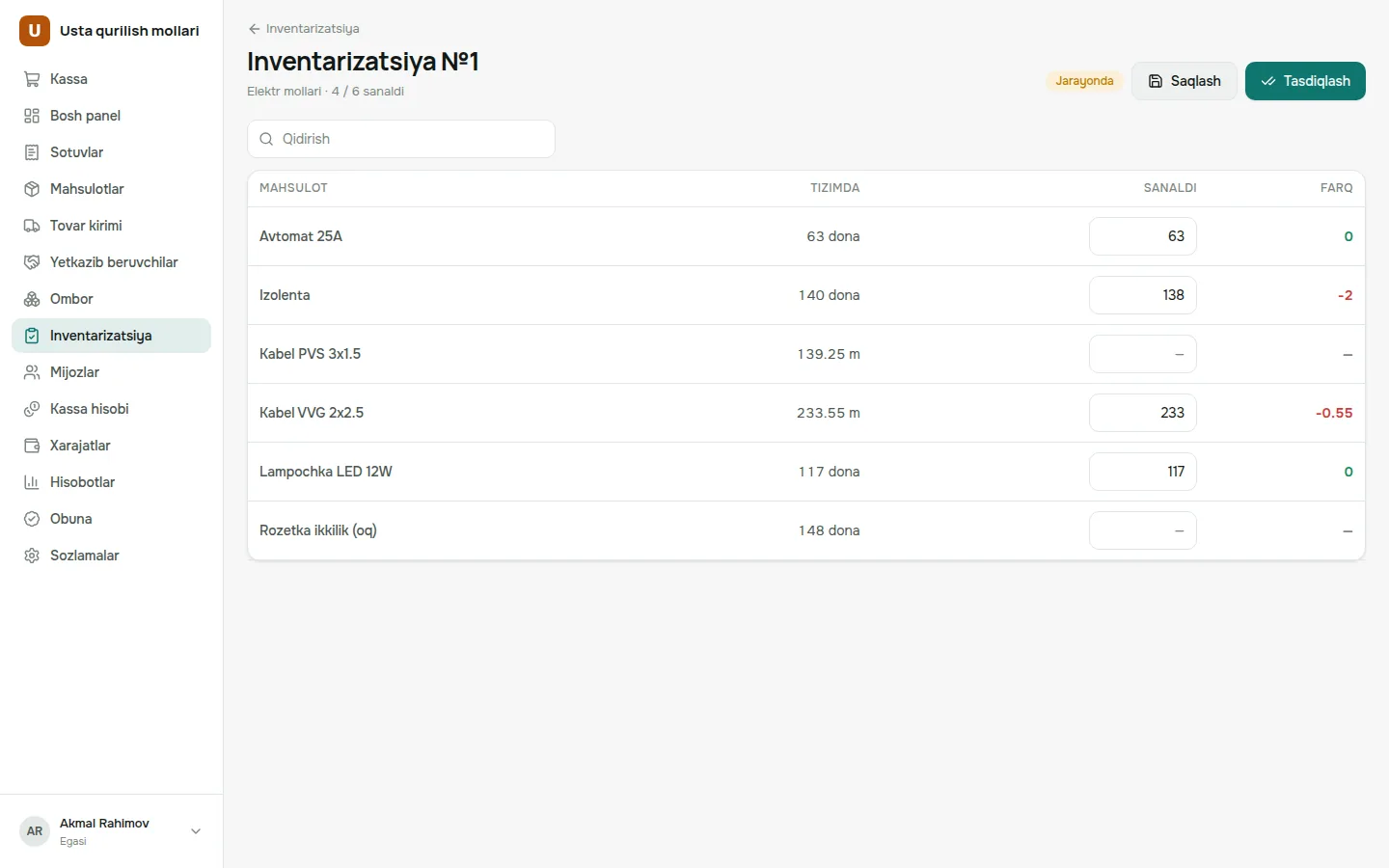
A list opens: each product with Tizimda (In the system: the app's stock), Sanaldi (Counted) and Farq (Difference). At the top a counter like 12 / 140 sanaldi (12 / 140 counted).
-
Count the goods on the shelf and type the number under Sanaldi. Find products fast with the search. Type weighed goods in kg:
3.250. -
Watch the Farq column: red minus means a shortage, yellow plus a surplus, green 0 correct. Recount a big difference before confirming.
-
Tap Saqlash (Save) from time to time. Counting can continue later: the count stays Jarayonda (In progress).
-
When done, tap Tasdiqlash (Confirm). The Inventarizatsiyani tasdiqlaysizmi? (Confirm the stock count?) window says how many products' stock will change. Tap Tasdiqlash again.
After confirming you see Qoldiqlar yangilandi (Stock updated); the count becomes Tasdiqlangan (Confirmed) and no longer changes. Every corrected product gets an Inventarizatsiya entry in its history.
What changes
Section titled “What changes”- Only products with a Sanaldi number change. Empty lines stay as they are: you can count one shelf a day.
- Stock becomes the counted number at the moment you confirm.
Clothes and sized goods
Section titled “Clothes and sized goods”Every size and colour is its own line: Ko'ylak Malika (98, Pushti), Ko'ylak Malika (104, Pushti). Type the model's name in the search to see all its sizes.
Questions
Section titled “Questions”Can we count with a scanner? Not at the moment: in a stock count you search for the product by name and type the number.
A newly added product is not in the list. The list is built from the products that existed when the count started. For a product added later, start a new count or fix its stock with Correcting stock.
Can two people count together? Let each count a different category in a separate stock count. If two phones fill in the same count at the same time, one can wipe out what the other typed.
If I pick a category, are its sub-categories included? No, only products assigned to exactly that category. Count a sub-category separately.
A product that does not track stock is missing. That is right: products with Qoldiqni hisoblash (Track stock) off are not counted.