Grocery and mini market
In a mini market most goods have a factory code: scan and sell. The rest are weighed (rice, sugar, sweets, fruit, sausage), and some come in blocks and boxes. The till has to be quick: the queue does not wait.
Set up once
Section titled “Set up once”-
Connect a USB scanner (Scanner). At the till, scan while the search is empty and the item goes straight into the basket.
-
Categories: Bread, Dairy, Drinks, Grains, Sweets, Sold by weight, Household chemicals.
-
If you have a label-printing scale, set it to the barcode format with weight (Scales).
-
If you need shelf price labels, switch on Yorliq (narx etiketkasi) (Labels) in Imkoniyatlar (Features).
-
Give best sellers a Minimal qoldiq (Minimum stock): you see them under Kam qolgan (Running low) before they run out.
Even when the internet drops, the till keeps selling: Working offline.
Kinds of goods
Section titled “Kinds of goods”| Goods | Unit | Pack | At the till |
|---|---|---|---|
| Coca-Cola 1.5 l | dona (piece) | Quti (box), 6 inside | Scanned |
| Bread | dona | — | With a button |
| Eggs | dona | Lotok (tray), 30 inside | Piece or tray |
| Cigarettes | pachka (pack) | Blok, 10 inside | Pack or block code |
| Rice, sugar (weighed) | kg | Qop (sack), 50 kg inside | Weight typed |
| Sausage, cheese (scale label) | kg | — | Scale label scanned |
| Sunflower oil (poured) | litr (litre) | — | Litres typed |
Adding goods with factory codes
Section titled “Adding goods with factory codes”Scan an item on the Mahsulotlar (Products) page: for a code the shop does not have, Yangi mahsulot (New product) opens by itself with the code filled in. Type the name, price and category and tap Saqlash (Save): you are back at the list; scan the next one. At the till too, scanning an unknown code opens a new product page for staff who may add products.
To load hundreds of items from Excel: CSV file.
Weighed goods
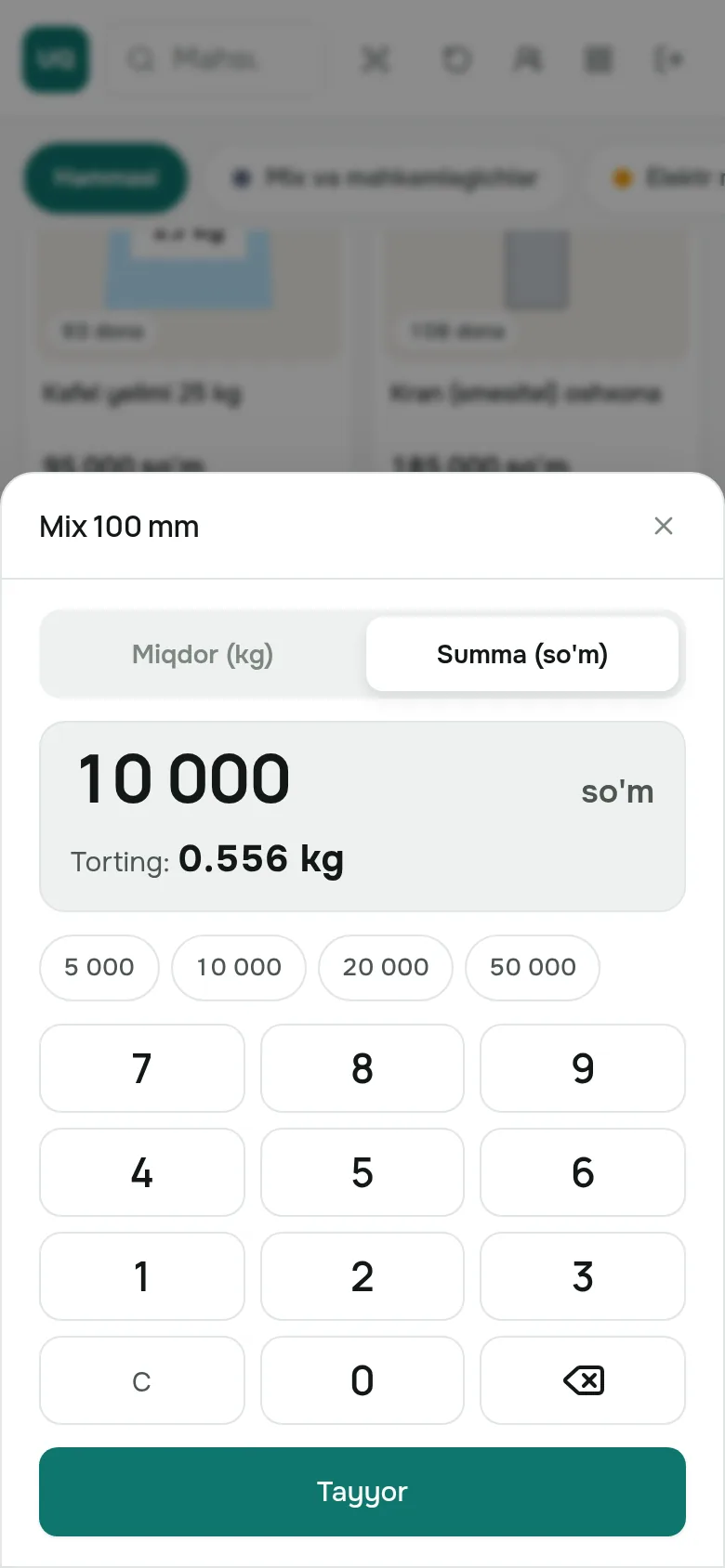
Section titled “Weighed goods”With an ordinary scale. The product's unit is kg; the price is per 1 kg. Tap the product at the till and the quantity sheet opens: type the weight from the scale (1.35) or tap 0.25, 0.5, 1, 1.5, 2. For "5 000 so'm of sweets", choose Summa (so'm).
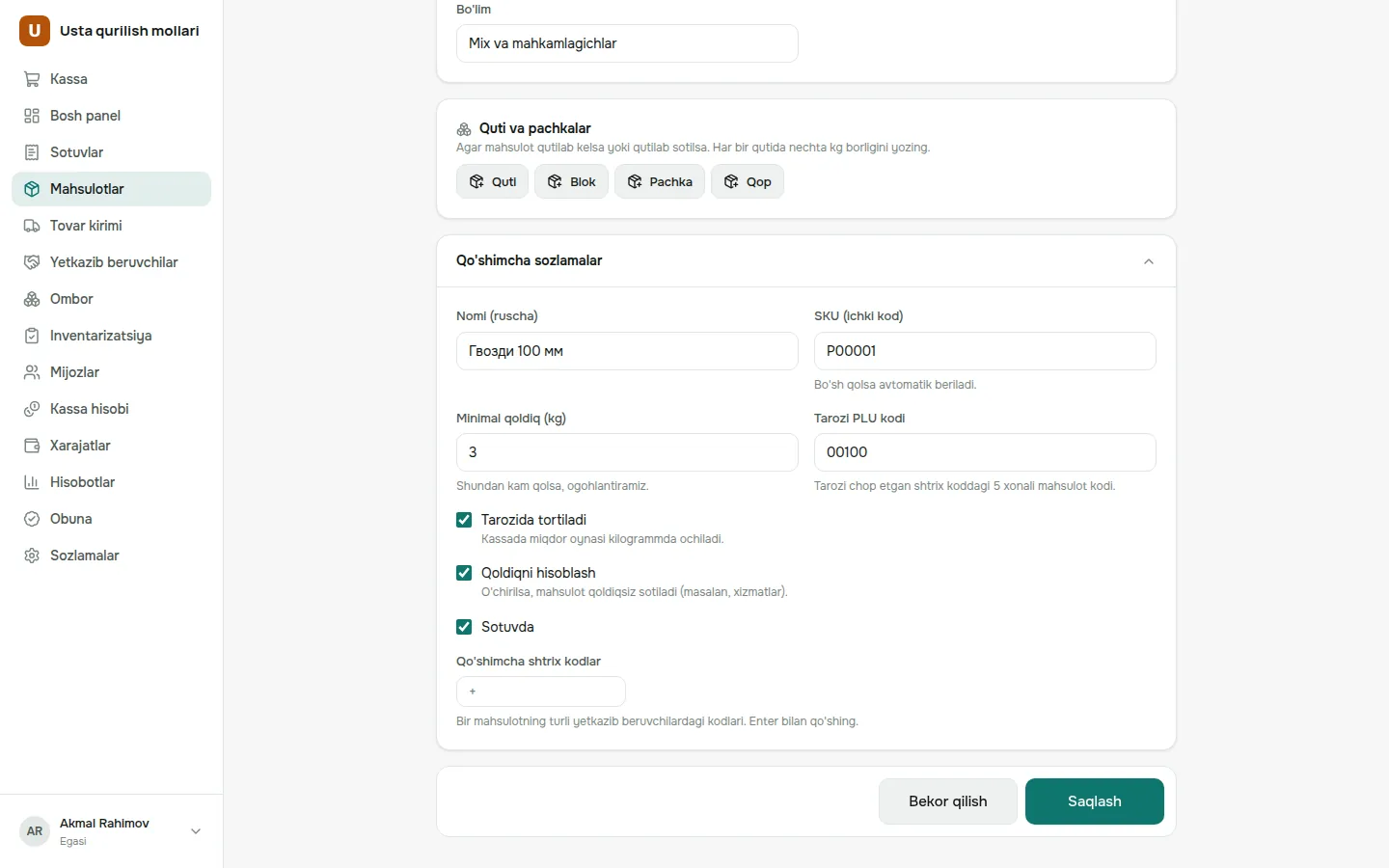
With a label-printing scale. Give the item a number in the scale (for example sausage = 42) and type 42 in the product's Tarozi PLU kodi (Scale PLU code) in our app. The seller weighs the sausage, the scale prints a label, the cashier scans it: Kolbasa Doktorskaya, 0.650 kg goes into the basket. The price comes from our app.
Full guide: Scales.
Blocks, boxes, trays
Section titled “Blocks, boxes, trays”Cigarettes sell by the pack and by the block. One product, unit pachka, with a Blok pack holding 10 and the block's code. The pack's code adds 1 pack, the block's code adds 1 block (10 packs). Stock is in packs. Drink boxes and egg trays work the same way (Box and piece).
When goods arrive
Section titled “When goods arrive”-
Tovar kirimi (Goods receiving) → Yangi kirim (New receipt) → supplier.
-
Scan the items and type the Miqdor (Quantity) on each line; tap an empty part of the page before scanning the next item (Goods receiving). Count what came in boxes as Quti under Nimada sanaysiz (What do you count in): 10 boxes of Coca-Cola = 60 pieces.
-
Check the prices against the invoice and tap Qabul qilish (Receive).
Update shelf labels for goods whose price changed (Labels).
Keeping an eye on stock
Section titled “Keeping an eye on stock”- Mahsulotlar → Kam qolgan: what needs ordering. On the dashboard: Tugab qolayotganlar (Running out).
- Take expired or spoiled goods off with Hisobdan chiqarish (Write-off) in Ombor (Stock) (Stock).
- Once a month, do a stock count one category at a time while the shop is closed (Stock count).
Everyday questions
Section titled “Everyday questions”The till does not show every product as a button. The till buttons show at most 120 products under Hammasi (All) or in one category. The scanner and search find any product. Put goods sold by button (bread, weighed goods) in their own category.
Can we track expiry dates? The app does not keep expiry dates. Take expired goods off with Hisobdan chiqarish.
Goods without a code (market produce, our own packs). Give a shop code with Yaratish (Create) on the product page and stick on a label (Barcodes).
The price on the scale label differs from the receipt. The till takes the price from our app. Make the scale's price the same.
Goods without an entered receipt will not sell. Normally goods not in stock are not sold. Enter the receipt first, or switch on Qoldiq yetmasa ham sotishga ruxsat berish (Allow selling when stock runs short) in Sozlamalar (Settings) → Do'kon (Shop) (Stock).