Expenses
An expense is money spent on running the shop: for example rent, electricity, lunch, transport, a seller's wages. Expenses come off profit: on Bosh panel (Dashboard), Sof foyda (net profit) = Yalpi foyda (gross profit) − Xarajatlar (expenses). Labels are given as the Uzbek app shows them.
First, add expense types
Section titled “First, add expense types”A new shop has no expense types, and without them no expense can be recorded. The owner or a manager adds them once:
-
Open Sozlamalar → Xarajat turlari (Settings → Expense types).
-
Tap Qo'shish (Add), type the name into Nomi (o'zbekcha) (name in Uzbek), for example "Ijara" (rent), and tap Saqlash (Save). If staff use the app in Russian, fill in Nomi (ruscha) (name in Russian) too.
-
Add the types you need the same way: "Ijara" (rent), "Kommunal" (utilities), "Oylik" (wages), "Tushlik" (lunch), "Yo'l kira" (transport), "Boshqa" (other).
A type cannot be deleted. When you no longer need one, open it with the pencil icon and switch off Faol (active): it stays in the list but can no longer be picked for a new expense.
Recording an expense
Section titled “Recording an expense”-
Open Xarajatlar (on a phone it is under Yana, More) and tap Yangi xarajat (new expense).
-
Choose the Turi (type).
-
Type the Summa (amount), for example
50 000. -
Sana (date): today's date is filled in. For yesterday's expense, change the date.
-
Write what it was for in Izoh (note), for example "Yuk tashuvchiga" (to the delivery driver).
-
With cash control on, a Kassadan berildi (paid from the drawer) switch shows too, and it is on. If the money came from the drawer, leave it on. If you paid by card or from your own pocket, switch it off.
-
Tap Saqlash.
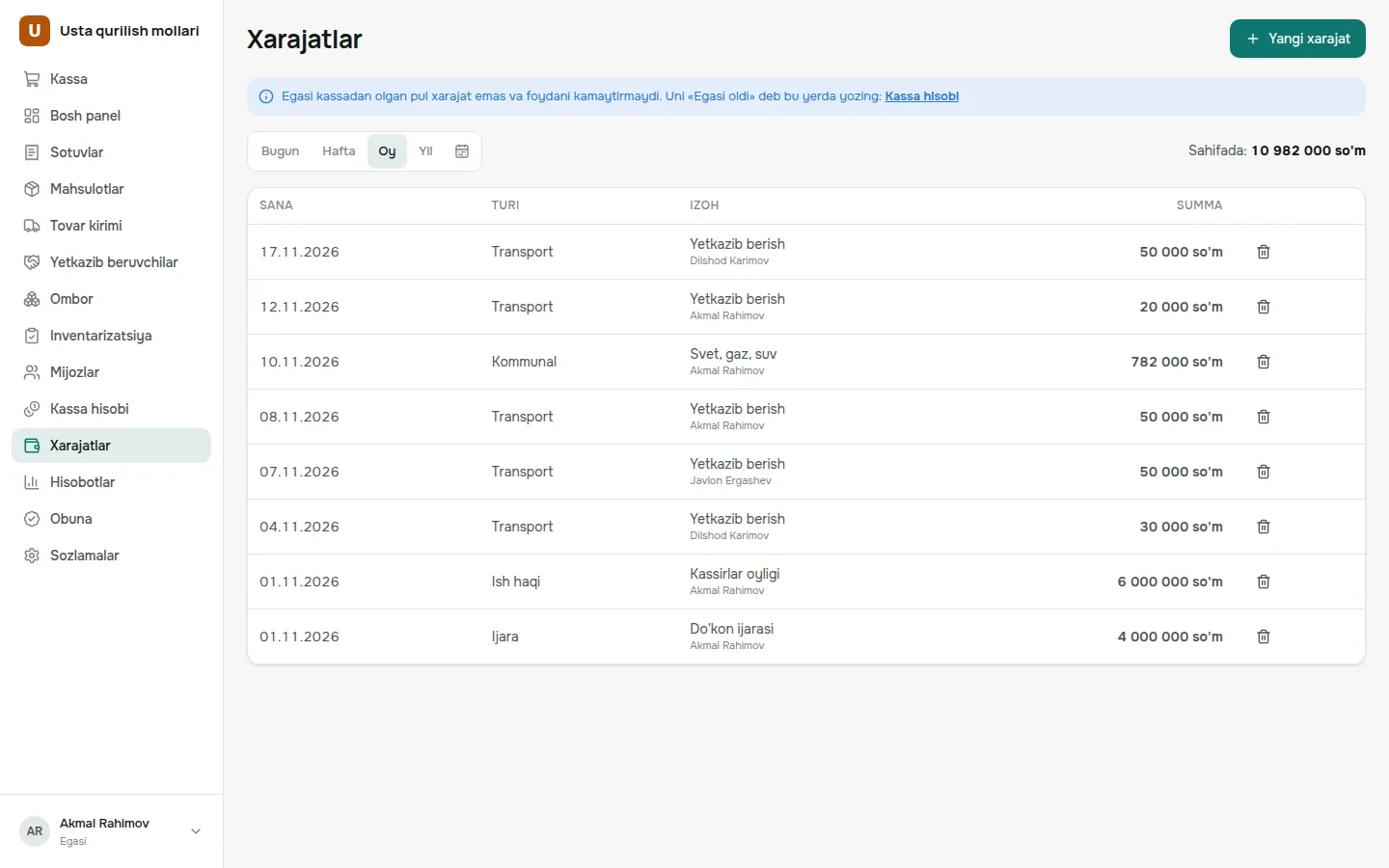
The list shows the date, type, note, who recorded it and the amount. Pick the period at the top: Bugun (today), Hafta (week), Oy (month), Yil (year) or your own dates with the calendar icon. The page opens on Oy. Next to Sahifada (on this page) is the total of the expenses on the page.
What is an expense and what is not
Section titled “What is an expense and what is not”| Money | Expense? | Where it goes |
|---|---|---|
| Rent, electricity, lunch, transport, wages | Yes | Xarajatlar |
| The owner took money from the drawer | No | Kassa hisobi → Pul olish → Egasi oldi (Cash control → Take money out → Owner took) |
| Paying a supplier for goods | No | Kassa hisobi → Pul olish → Ta'minotchiga to'lov (payment to a supplier) or the supplier's page |
| Money refunded to a customer | No | Returns |
Money paid for goods is not an expense: when the goods sell, their cost comes off profit by itself. Recording it as an expense too would take it off profit twice.
Who can do what
Section titled “Who can do what”| Action | Cashier | Owner, manager |
|---|---|---|
| Record an expense | Yes | Yes |
| Delete an expense | No | Yes |
| Add expense types | No | Yes |
The owner or a manager deletes a wrong expense with the bin icon in the list.
Questions
Section titled “Questions”The expense type list is empty. No types have been added yet. The owner or a manager adds them in Sozlamalar → Xarajat turlari.
I paid a seller's wages. Is that an expense? Yes. Record it with the "Oylik" (wages) type.
Where do I see expenses by type? The owner sees them in Hisobotlar → Xarajatlar (Reports → Expenses): the amount for each type and how many times it was recorded. More: Reports.
An expense paid from the drawer does not show in cash control. Kassadan berildi was off when it was recorded. The owner or a manager should delete the expense and record it again.