Cash control
Kassa hisobi (Cash control) follows the cash in the drawer: how much should be there right now, where money came from and where it went. At the end of the day you count the money and the app shows any shortage or overage. Labels are given as the Uzbek app shows them.
It never stops selling. The app has no shifts, and closing the day is only for counting the money.
Switching it on
Section titled “Switching it on”The Kassa hisobi page shows only when this feature is on. The owner or a manager opens Sozlamalar → Imkoniyatlar (Settings → Features) and, in the Kassa nazorati (cash control) block, switches on Kassadagi pulni kuzatish (track the cash in the drawer). Kassa hisobi then appears in the menu (on a phone, under Yana, More).
Only the owner and managers see the page. Cashiers keep selling as usual.
Starting the count
Section titled “Starting the count”-
Open Kassa hisobi. The Kassa hisobini boshlash (start cash control) box appears.
-
Count the cash in the drawer and type it into Hozir kassada (so'm) (in the drawer now). With dollars switched on, type the dollars into Hozir kassada ($).
-
Tap Boshlash (Start).
From then on every sale, return, expense and withdrawal is counted by itself.
What should be in the drawer
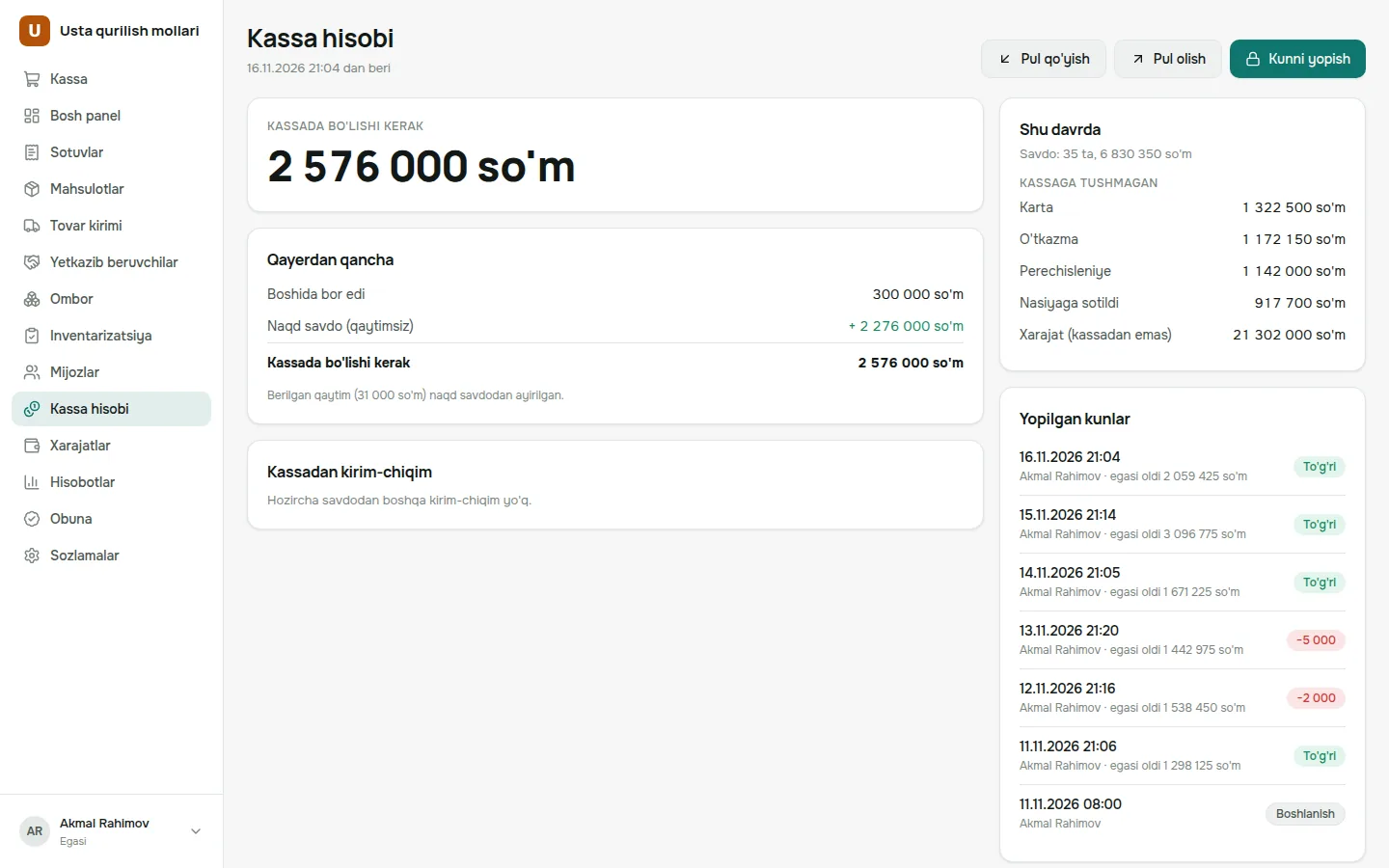
Section titled “What should be in the drawer”The big figure on the page is Kassada bo'lishi kerak (should be in the drawer). The Qayerdan qancha (where from) box works it out like this:
| Line | Sign |
|---|---|
| Boshida bor edi (cash left in the drawer at the last close) | |
| Naqd savdo (qaytimsiz): cash sales, less the change given | + |
| Mijozlar to'lovi (qarz, avans): what customers paid in cash on debts and advances | + |
| Kassaga qo'yildi: money put in | + |
| Qaytarilgan tovar puli: refunds paid in cash | − |
| Mijozga avans qaytarildi: advances paid back in cash | − |
| Xarajatlar: expenses paid from the drawer | − |
| Ta'minotchilarga: supplier payments from the drawer | − |
| Egasi oldi: the owner took | − |
Dollars are counted apart: Dollar bo'lishi kerak (dollars that should be there).
The Shu davrda (this period) box at the side shows how many sales were made since the last close and their total. Its Kassaga tushmagan (not in the drawer) part lists money that never went into the drawer: Karta (card), O'tkazma (transfer), Perechisleniye (bank transfer), Nasiyaga sotildi (sold on credit), Avansdan sotildi (sold from advances), Qarz to'lovi (karta, o'tkazma) (debts paid by card or transfer), Avans qaytarildi (karta, o'tkazma) (advances paid back by card or transfer) and Xarajat (kassadan emas) (expenses not paid from the drawer). This money is not added to the drawer's figure.
Putting money in
Section titled “Putting money in”For example, you put small notes in the drawer for change in the morning:
-
Tap Pul qo'yish (put money in).
-
Type the Summa (amount). With dollars switched on, first pick so'm or $.
-
Add an Izoh (note) if you like and tap Saqlash (Save).
Taking money out
Section titled “Taking money out”Tap Pul olish (take money out) and choose what the money is for:
- Egasi oldi (the owner took it): the shop owner took the money for themselves. This is not an expense, so profit does not go down.
- Xarajat (expense): lunch, rent, transport and so on. It comes off profit. Picking it opens the expense window: Expenses.
- Ta'minotchiga to'lov (payment to a supplier): money paid for goods. This is not an expense either. Pick the Ta'minotchi (supplier) from the list or write the name in the note. If you keep a debt account with that supplier, what you owe them goes down too.
Type the amount and a note and tap Saqlash. Everything shows in the Kassadan kirim-chiqim (money in and out of the drawer) list.
Closing the day
Section titled “Closing the day”-
Tap Kunni yopish (close the day).
-
Count the money in the drawer and type it into Sanaldi (counted). What should be there is not shown yet, so the count stays honest. Tap Davom etish (continue).
-
Now Kassada bo'lishi kerak, Sanaldi and the difference show: To'g'ri (correct), Kamomad (short) or Ortiqcha (over).
-
Type what you are taking into Egasi oladi (the owner takes), or tap Hammasi (all). "Ertaga kassada qoladi: ..." (stays in the drawer for tomorrow) shows below.
-
If there is a difference, write the reason in Izoh. Tap Kunni yopish.
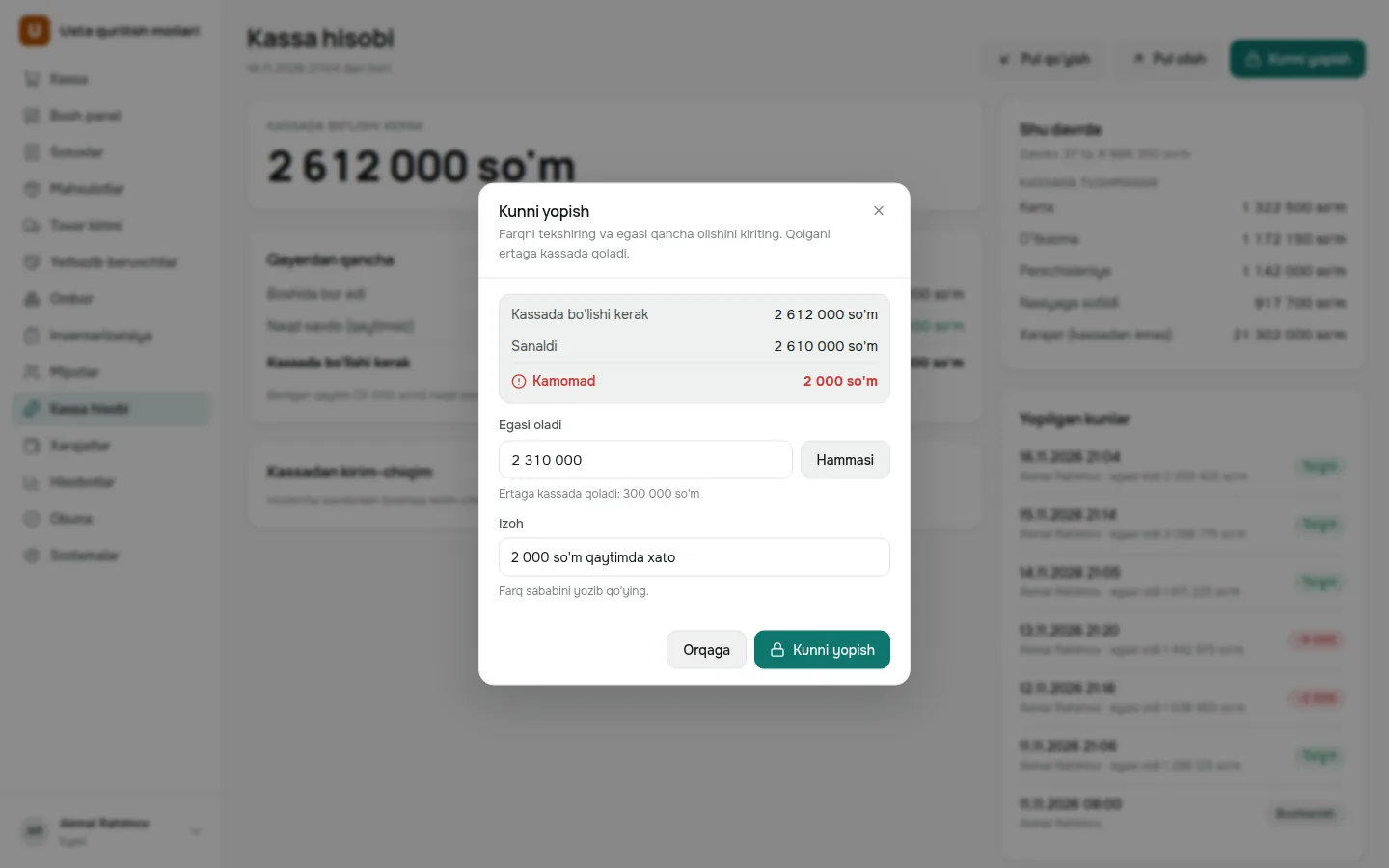
The money left in the drawer becomes the next period's Boshida bor edi. The closed day goes into the Yopilgan kunlar (closed days) list. Tap it to see that period's full account.
You do not have to close every day. Close whenever it suits you: for example every evening or once a week.
Offline sales
Section titled “Offline sales”If tills still hold sales made offline and not yet sent, closing the day warns you: "Kassalarda hali 2 ta sotuv (...) yuborilmagan: kutilgan summa to'liq emas." (tills still hold 2 unsent sales: the expected amount is not complete). If you can, close after they arrive.
Sales that arrive after the close show as a separate line in that day's account, and the real difference is worked out again. More: Working offline.
Questions
Section titled “Questions”"Kassada bo'lishi kerak" went below zero. More money out was recorded than the drawer held. Perhaps some of it was paid from elsewhere, for example the owner's own pocket. For such an expense or supplier payment, Kassadan berildi (paid from the drawer) should have been switched off.
I paid an expense by card. Does it affect cash control? Record the expense on the Xarajatlar page and switch off Kassadan berildi. The drawer's figure then stays as it is, and the expense still comes off profit.
Can a wrong money-in or money-out entry be deleted? Yes, but only until the day is closed. The owner or a manager can delete an entry that has a bin icon next to it (money put in, money the owner took, money paid to a supplier). Once the day is closed these entries cannot be deleted. A wrong expense is deleted on the Xarajatlar page instead.
Does a cashier see cash control? No, only the owner and managers see it. But with cash control on, an expense a cashier records also comes off the drawer's figure (if Kassadan berildi is on).
Does closing the day stop sales? No. The till keeps working. Closing is only for counting the money and recording what the owner takes.