Credit and advances
Nasiya (credit): the customer takes the goods now and pays later. The app keeps every customer's debt by itself: who took what, when, how much, and how much they paid is kept in the Nasiya daftari (credit book) on the customer's page. No paper book needed. Labels are given as the Uzbek app shows them.
Credit needs no switch: every shop has it. Cashiers sell on credit too.
Selling on credit
Section titled “Selling on credit”-
Add the products to the basket.
-
Tap Mijoz qo'shish (add customer) at the bottom of the basket and pick the customer. For a new customer tap Yangi (new) and type the name and phone.
-
Tap To'lov (Payment), then tap Nasiya.
-
If the customer pays part now, type it into Hozir naqd to'laydi (paying cash now). For example, of a 300 000 so'm purchase they pay 100 000 now: the window shows Nasiyaga yoziladi: 200 000 (goes on credit).
-
Check the Mijozning qarzi bo'ladi (customer's debt will be) line and tap To'lovni tasdiqlash (Confirm payment).
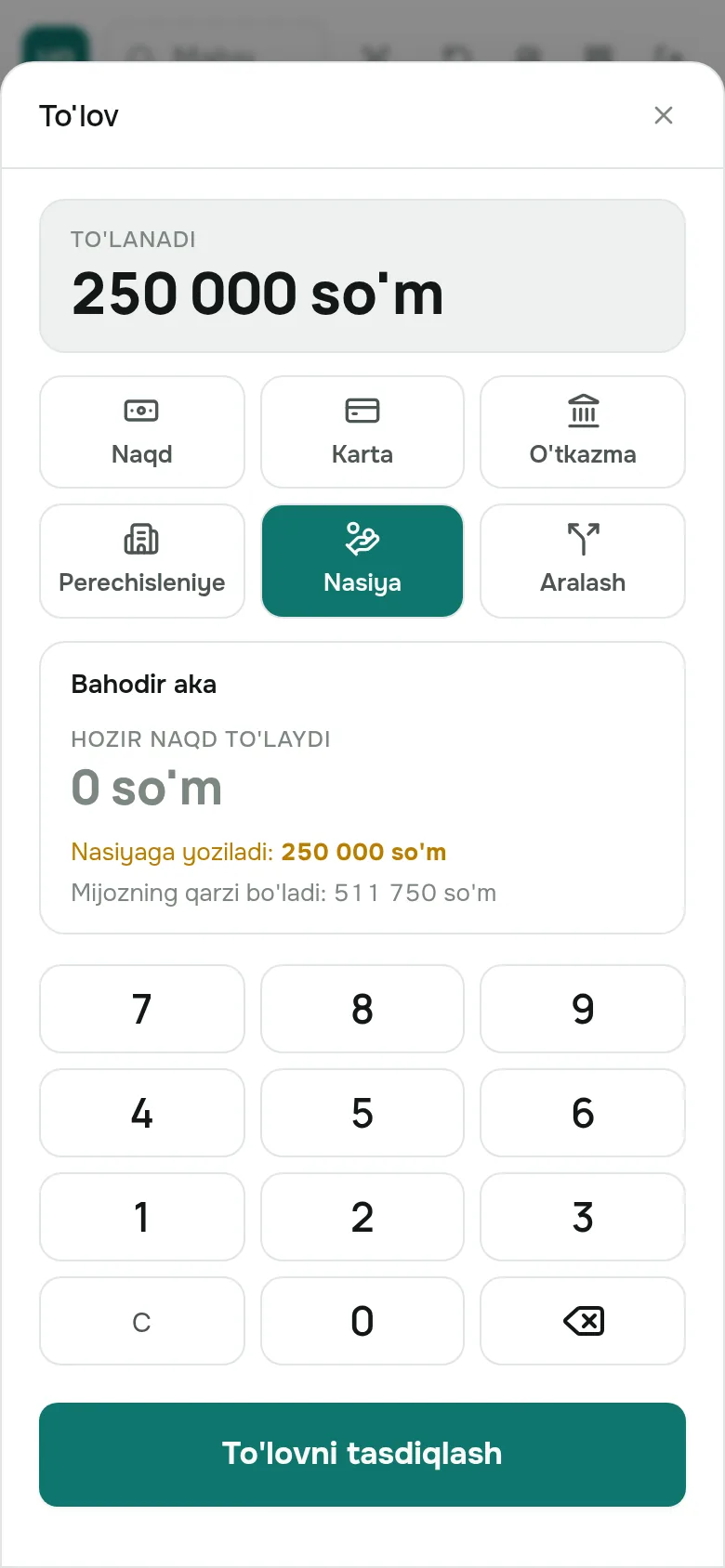
If the customer pays everything now, choose Naqd (cash), not Nasiya. Otherwise the window says: "Hammasi to'langan: nasiya kerak emas, Naqd ni tanlang." (all paid: no credit needed, choose cash).
What the receipt shows
Section titled “What the receipt shows”Every receipt of a sale with a customer shows:
- the customer's name and phone;
- To'landi (paid): how much they paid now;
- Eski qarz (old debt): their debt before this purchase;
- Yangi qarz (new debt): their debt after it.
If the customer had an advance before the purchase, Oldingi avans (advance before) shows instead of Eski qarz. If some advance is left after it, Qolgan avans (advance left) shows instead of Yangi qarz.
Credit limit
Section titled “Credit limit”You can set the most each customer may owe: Mijozlar → open the customer → Tahrirlash (Edit) → Nasiya chegarasi (credit limit), for example 2 000 000. With 0 there is no limit.
If new credit would take the debt past the limit, the sale does not go through. Let the customer pay part in cash, or raise the limit.
Advance: money paid ahead
Section titled “Advance: money paid ahead”Some customers pay ahead for their next purchases. This is called an Avans (advance).
Taking an advance. Mijozlar → open the customer → Avans qabul qilish (take an advance; this button shows when the customer owes nothing). Type the amount, choose the way of paying and confirm. A cashier takes an advance in cash only. More: Customers.
Selling against an advance. When you pick a customer with an advance:
- the basket shows the Avans amount in green;
- in the payment window the Nasiya button reads Avansdan (from the advance);
- tapping Avansdan shows "Mijozning avansi: ..." (customer's advance) and the purchase is paid from the advance.
If the advance is not enough, the rest goes on credit by itself: the window shows Avansdan and Nasiyaga yoziladi separately. If some advance is left over, Qolgan avans shows.
Taking a debt payment
Section titled “Taking a debt payment”When a customer comes to pay their debt:
-
Open the Mijozlar (Customers) page and find the customer. The Qarzdorlar (debtors) button shows only those who owe.
-
Open the customer and tap Qarzni to'lash (pay debt).
-
The amount is already the whole debt: change it if the customer pays less. Choose the way of paying: Naqd, Karta, O'tkazma (and Perechisleniye when bank transfers are on).
-
"To'lovdan keyin qarz: ..." (debt after payment) shows below. Tap Qarzni to'lash.
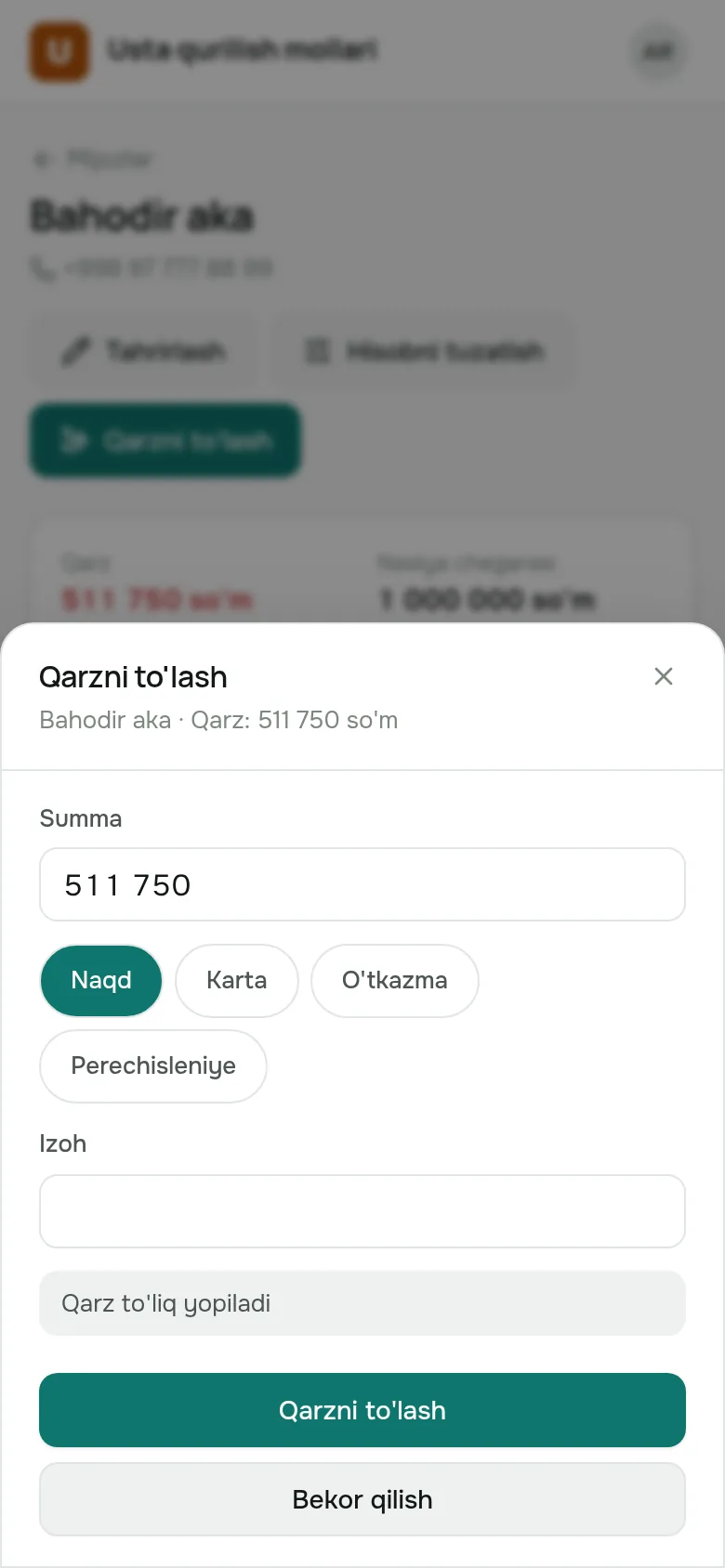
If the customer pays more than the debt, the extra stays as an advance: the window says "... qarz yopiladi, ... avans bo'lib qoladi" (the debt is closed, the rest stays as an advance). A cashier can take the extra in cash only.
Who can do what
Section titled “Who can do what”| Action | Cashier | Owner, manager |
|---|---|---|
| Sell on credit | Yes | Yes |
| Take a debt payment | Yes | Yes |
| Take an advance in cash | Yes | Yes |
| Take an advance by card, transfer or bank transfer | No | Yes |
| Pay back an advance, correct an account | No | Yes |
Without the internet
Section titled “Without the internet”You can sell on credit without the internet. The till checks the credit limit against what it knows on that device plus the credit sales it has not sent yet. Adding a new customer, though, needs the internet. More: Working offline.
Questions
Section titled “Questions”If goods sold on credit come back, where does the money go? In the return window, choose Nasiya in the Pulni qaytarish usuli (how the money is returned) list: the amount comes off the customer's debt. The window opens with Naqd (cash) chosen, so check it before confirming. More: Returns.
Can I see which goods a customer bought and at what price? Yes: in the Sotib olgan mahsulotlari (products they bought) list on the customer's page. At the till too, once the customer is picked, their last price shows on the product tile.
Where do I see who owes how much? Mijozlar → Qarzdorlar. The total of all customers' debts is the Mijozlar qarzi (jami) (customers' debt, total) figure on the Bosh panel (Dashboard) page (the owner and managers see the dashboard).
I recorded a debt by mistake. The owner or a manager fixes it on the customer's page with Hisobni tuzatish (correct the account) → Tuzatish (correction), always with a reason. If the whole sale was a mistake, it can be cancelled with Bekor qilish on the Sotuvlar (Sales) page: that sale's credit goes too.