Shop details
Sozlamalar → Do'kon (Settings → Shop) holds the basic details of your shop: its name, phone, address and logo. They show on receipts and in the app menu.
The Egasi (Owner) and the Boshqaruvchi (Manager) can change this page.
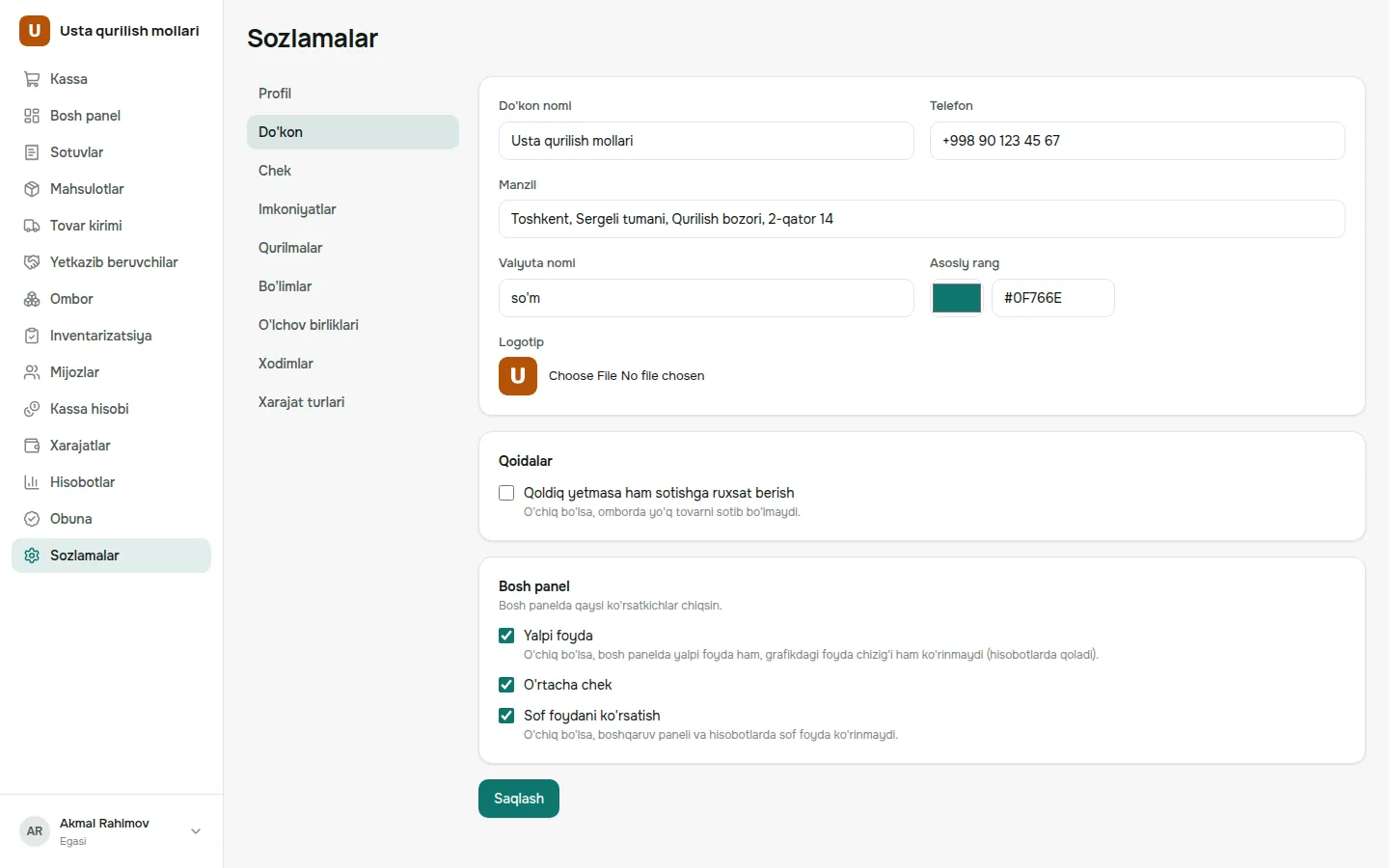
Filling in the details
Section titled “Filling in the details”-
Open Sozlamalar in the menu, then Do'kon.
-
Fill in the fields (see the table below).
-
Press Saqlash (Save) at the bottom.
| Field | Where it shows |
|---|---|
| Do'kon nomi (Shop name) | At the top of the menu, on the till, at the top of the receipt. The Windows till shortcut is named after it too. |
| Telefon (Phone) | On the receipt, under the shop name. |
| Manzil (Address) | On the receipt, under the shop name. |
| Valyuta nomi (Currency name) | Next to amounts. Usually so'm. |
| Asosiy rang (Main colour) | The colour of the app's buttons and marks. Pick a colour or type its code, such as #0F766E. |
| Logotip (Logo) | In the menu, on the receipt (in black and white) and on the A4 sheet. Pick an image file. |
Rules: selling when stock runs short
Section titled “Rules: selling when stock runs short”The Qoldiq yetmasa ham sotishga ruxsat berish (Allow selling when stock runs short) switch:
- Off (the usual setting): goods whose stock is not enough cannot be sold. At payment the till shows an error message and the sale does not go through.
- On: goods sell even when the stock does not show them, and the stock goes below zero.
When to switch it on: when you have not entered your stock yet but want to start selling. Once the stock is entered, switch it off: then the figures in Ombor (Stock) stay right.
Dashboard figures
Section titled “Dashboard figures”In the Bosh panel (Dashboard) block you choose which figures show on the dashboard. The choice is the same for everyone: the owner and the manager both see it.
- Yalpi foyda (Gross profit): when off, neither gross profit nor the chart's profit line shows on the dashboard (reports keep it).
- O'rtacha chek (Average receipt).
- Sof foydani ko'rsatish (Show net profit): when off, net profit shows neither on the dashboard nor in reports.
More: Dashboard.
Other parts of Settings
Section titled “Other parts of Settings”| Section | What it is for | More |
|---|---|---|
| Profil (Profile) | Your own password, language and theme (light or dark). Everyone has it. | Adding staff |
| Chek (Receipt) | Receipt paper (58 mm, 80 mm, A5, A4), text at the top and bottom of the receipt. | Receipts |
| Imkoniyatlar (Features) | Dollars, mixed payment, wholesale prices, price control and other extras. | Features |
| Qurilmalar (Devices) | This computer's or phone's printer, cash drawer, scanner. Everyone has it. | Receipt printer |
| Bo'limlar (Categories) | Product categories. | Categories |
| O'lchov birliklari (Units) | Piece, kg, litre, metre and others. | Units |
| O'lcham va ranglar (Sizes and colours) | Clothing and shoe sizes, colours. Shows when it is switched on in Imkoniyatlar. | Sizes and colours |
| Xodimlar (Staff) | Staff, roles, PINs. Owner only. | Adding staff |
| Xarajat turlari (Expense types) | Types such as rent, wages, utilities. | Expenses |
Questions
Section titled “Questions”If I change the shop name, do old receipts change? If you reprint an old receipt, it shows the new name. Sales and amounts do not change.
Can I change the shop's web address (dokoningiz.kassapos.online)?
Not in the settings. If you need to, contact the administrator who set up your shop.
Does a cashier see this page? No. In Sozlamalar a cashier sees only Profil and Qurilmalar.