Sellers and obyom
The app has no shifts: every sale remembers who made it. So you can see how much each seller sold for any period.
Seller cards
Section titled “Seller cards”-
Open Sotuvlar (Sales) in the menu.
-
Pick a period: Bugun (Today), Kecha (Yesterday), Hafta (Week), Oy (Month) or the calendar icon.
-
A card for each seller shows above the list.
A card shows:
- the seller's name and how many receipts they rang up;
- revenue (the big number);
- Foyda (Profit), seen only by the owner and the manager;
- Obyom (when switched on, see below);
- payment types: Naqd (Cash), Karta (Card), O'tkazma (Transfer), Nasiya (Credit) and, when used, Perechisleniye (Bank transfer) and Dollar too;
- Qaytarilgan summa (Refunded), if any of their sales were refunded.
The seller's page
Section titled “The seller's page”Tap a card and that seller's page opens for the same period.
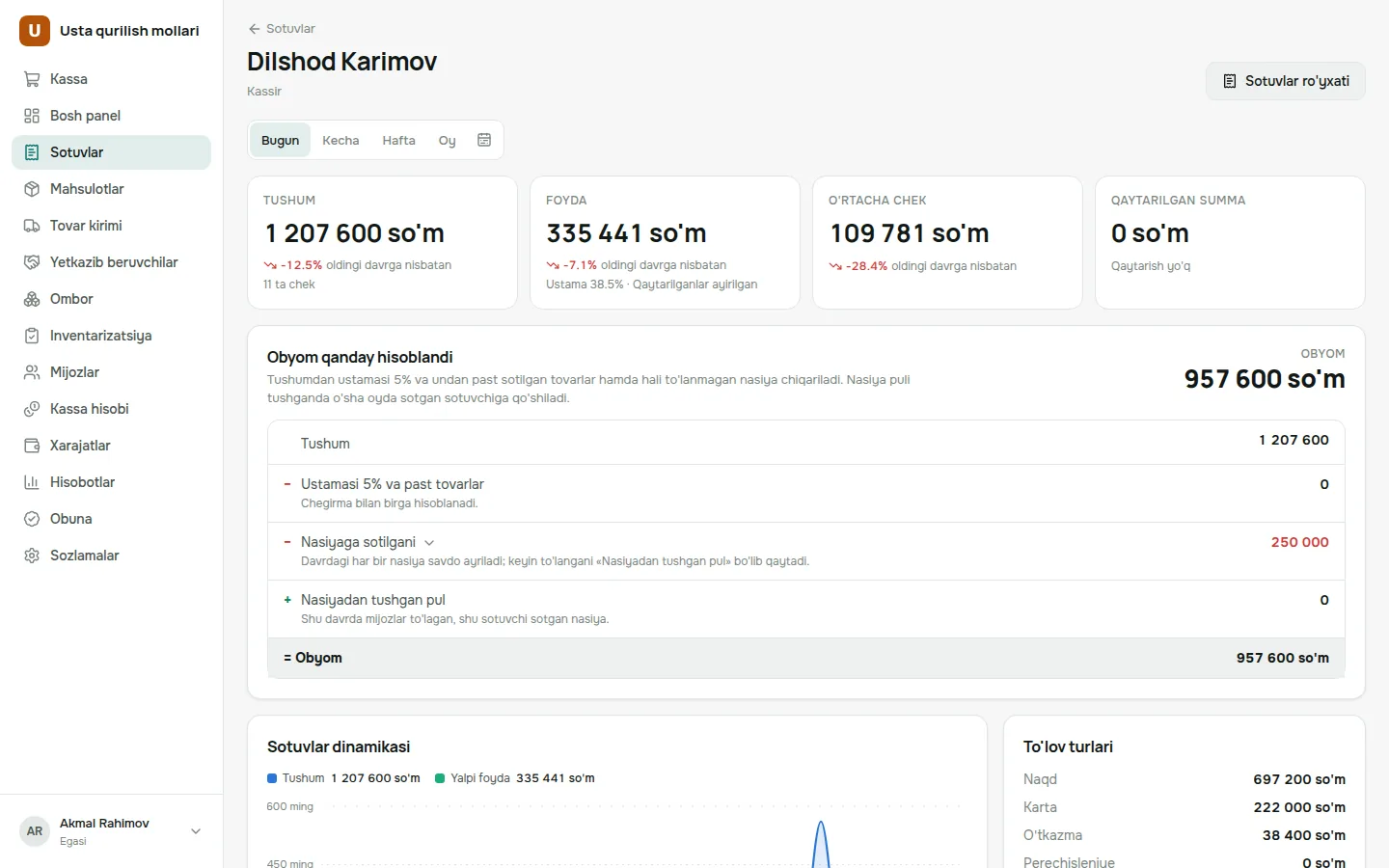
The page shows:
- Tushum (Revenue): the number of receipts under it and the change against the previous period next to it.
- Foyda (Profit): profit after refunded goods, with the Ustama (Markup) percent under it. Owner and manager only.
- O'rtacha chek (Average receipt).
- Qaytarilgan summa (Refunded): money refunded on their sales, with Sof tushum (Net revenue) under it.
- The Sotuvlar dinamikasi (Sales over time) chart and Eng ko'p sotilganlar (Best sellers).
- To'lov turlari (Payment types): cash, card, credit and others.
- Berilgan chegirma (Discount given), Mijozlar (Customers: how many customers they sold to) and Ruxsat bilan sotilgan (Sold with approval). The last one shows when price control is on: the number of sales price control stopped that went through after a confirmation or approval.
The Sotuvlar ro'yxati (Sales list) button opens this seller's receipts.
What obyom is
Section titled “What obyom is”Many shops pay sellers a share of their sales as wages. But not every sale is equal: goods sold at almost no markup and credit nobody has paid yet brought the shop no money. Obyom (from the Russian "объём", volume) leaves those out.
Obyom is worked out like this:
Obyom = Revenue − goods whose markup is not above the set percent − sold on credit + credit money collected − money refunded- Low-markup goods: lines whose markup, counting discounts, is at the set percent (for example 3%) or less. A product with no cost entered counts towards obyom.
- Sold on credit: every credit sale in the period is taken off.
- Credit money collected: when a customer pays their debt, the money counts for the seller who made that credit sale, in the period the money arrives. A customer's payment settles their oldest debt first. Credit paid from the customer's advance counts at once.
- Money refunded: money given back to customers for their sales (cash, card, transfer) and money they handed back on a return without a receipt.
A bank transfer markup does not count towards obyom either: it is the shop's bank cost.
Example. A seller sold 10 000 000 so'm of goods in a month. Of that, 300 000 so'm went at a markup of 3% or less, and 1 500 000 so'm was given on credit. Customers paid 500 000 so'm of last month's credit. 200 000 so'm was refunded. Obyom: 10 000 000 − 300 000 − 1 500 000 + 500 000 − 200 000 = 8 500 000 so'm.
Switching obyom on
Section titled “Switching obyom on”Only the owner changes the obyom rules, because the manager may be paid on obyom too.
-
Open Sozlamalar → Imkoniyatlar (Settings → Features).
-
In the Sotuvchi obyomi (Seller obyom) block, switch on Sotuvchilar obyomini hisoblash (Calculate sellers' obyom).
-
Type the percent in Eng past ustama, % (Lowest markup, %); it starts at 3. Goods sold at this markup or less do not count. It saves when you leave the field or press Enter.
Obyom then shows on the seller cards and the seller's page. The owner and the manager see it.
Checking how obyom was worked out
Section titled “Checking how obyom was worked out”The seller's page has an Obyom qanday hisoblandi (How obyom was worked out) block, with each line separate:
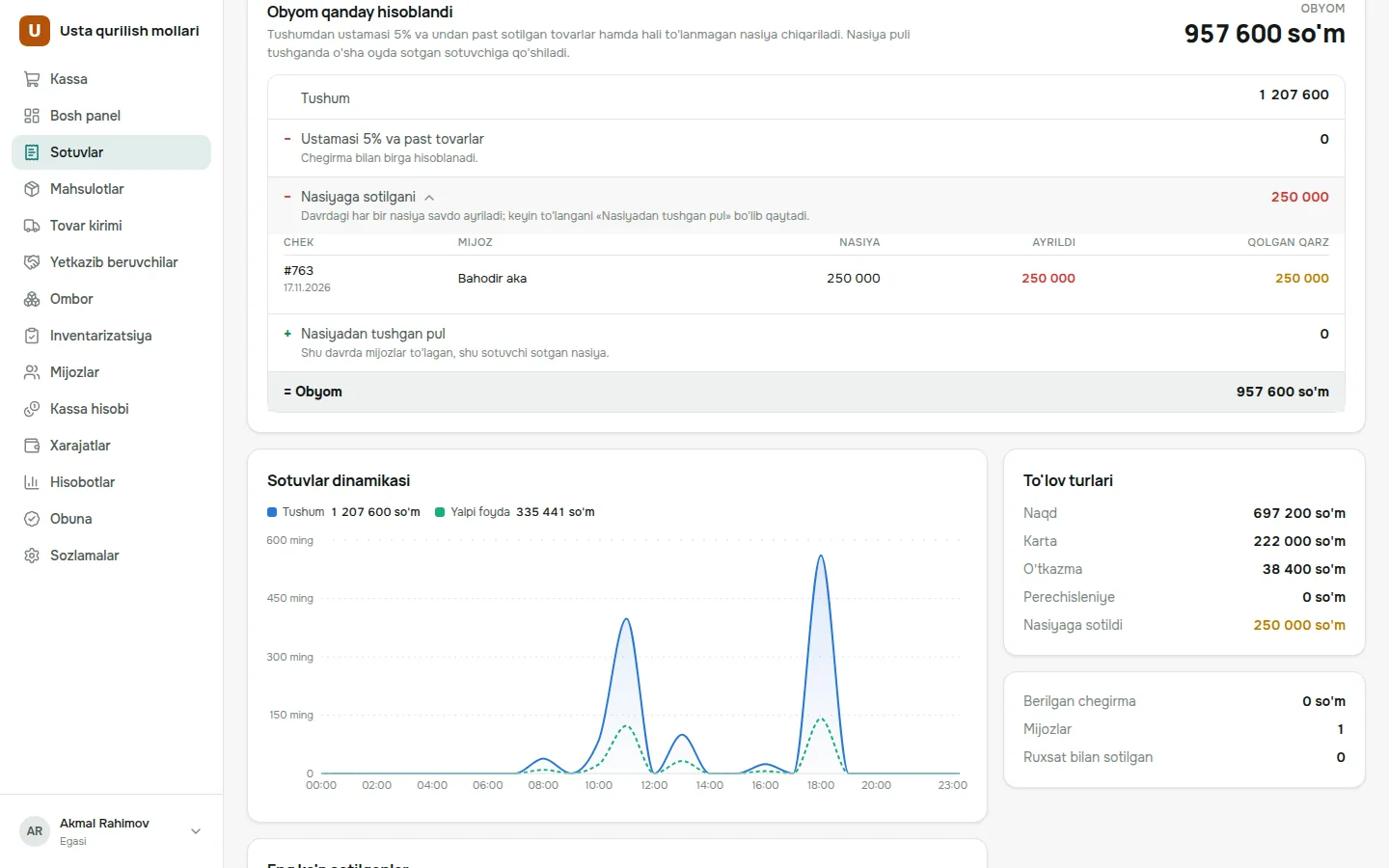
- Tushum (Revenue)
- − Ustamasi 3% va past tovarlar (Goods at 3% markup or less)
- − Nasiyaga sotilgani (Sold on credit)
-
- Nasiyadan tushgan pul (Credit money collected)
- − Qaytarilgan (naqd, karta) (Refunded, cash and card; shows only when there were refunds)
- = Obyom
Tap one of the first three lines to open the list behind it:
- Low-markup goods: receipt, product, what it sold for, its cost and its markup.
- Sold on credit: receipt, customer, credit amount, how much came off obyom and the debt still owed.
- Credit money collected: receipt, customer, how much was paid and how much was added to obyom.
Tap a receipt number to open the sale. Check here before paying wages.
Questions
Section titled “Questions”Can a cashier see another cashier's sales? No. A cashier sees only their own sales.
A seller left. Are their sales lost? No. Edit the person and switch off Faol (Active): they can no longer sign in, but their sales and card stay. More: Adding staff.
Two people work one till. How do I tell who sold what? Give each a PIN. At the till they swap with the Xodimni almashtirish (Switch seller) button. More: PIN.
Which month does credit money count in? The month the money arrives, for the seller who made that credit sale.