Categories
A category (Bo'lim) is a group of products: drinks, bread, clothes, electrical, paint. Categories are buttons at the till: when the cashier taps Ichimliklar (Drinks), only drinks remain. Reports and stock counts can also be split by category.
Adding a category
Section titled “Adding a category”The owner and the manager add categories.
-
Sozlamalar (Settings) → Bo'limlar (Categories) → Qo'shish (Add).
-
Nomi (o'zbekcha) (Uzbek name):
Ichimliklar. If staff use Russian, Nomi (ruscha) (Russian name):Напитки. -
Rang (Colour): the category's button on the till shows a dot in this colour. The colour helps the cashier find a category fast.
-
Tartib (Order): smaller numbers come first. Give the best-selling category
10and a slower one50. -
Saqlash (Save).
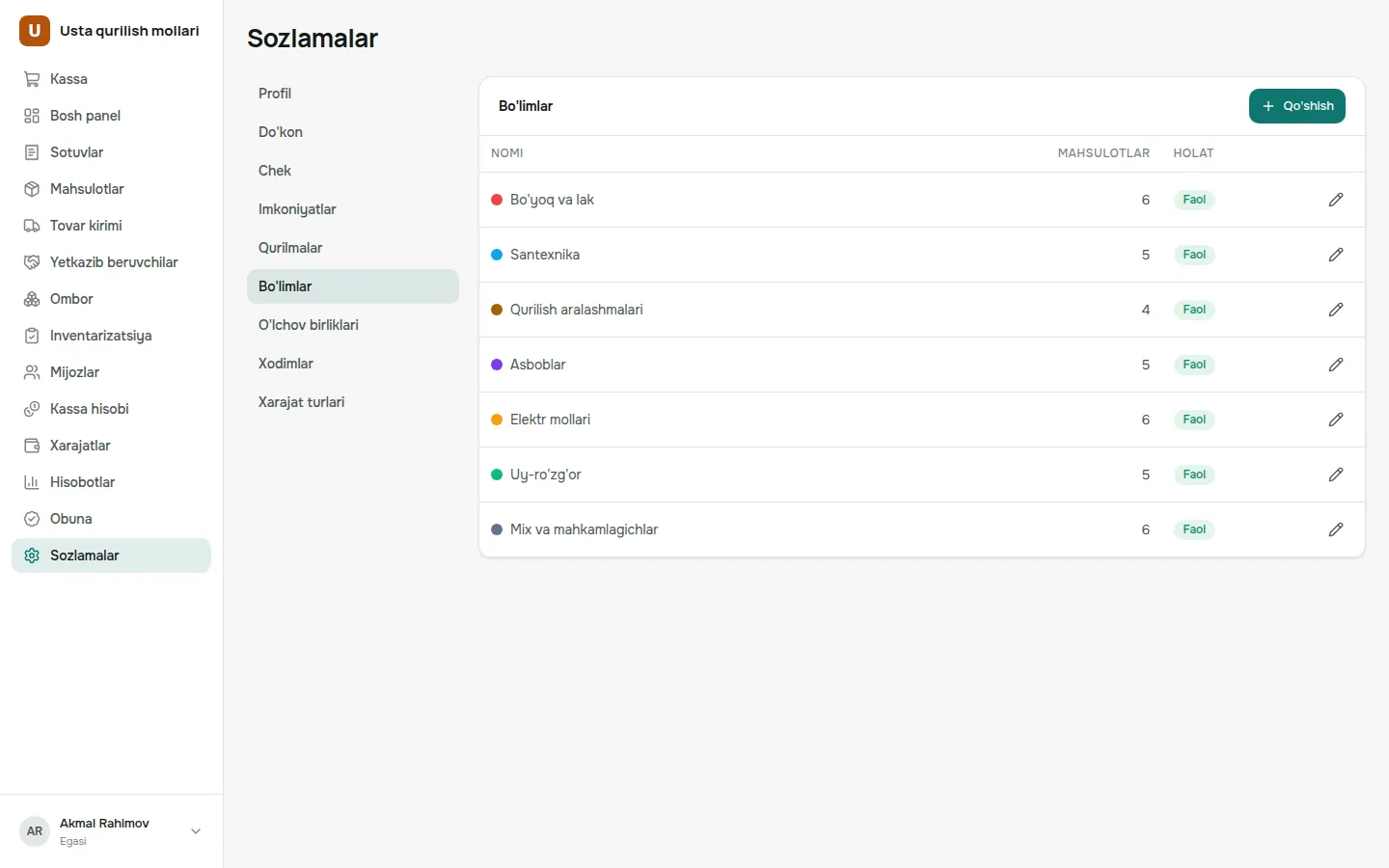
To put a product in a category, pick the Bo'lim on the product page. When loading a CSV file, missing categories are created.
At the till
Section titled “At the till”The top of the till shows Hammasi (All) and the categories. Only categories with products in them appear. Typing a word in the search searches every category.
Sub-categories
Section titled “Sub-categories”A category can have an Ota bo'lim (Parent category): for example Gazli suvlar (Sparkling water) with the parent Ichimliklar. One level only: a sub-category cannot have its own sub-categories.
At the till every category is its own button and shows only the products assigned to it. For a small shop 5-15 plain categories are usually enough.
Removing a category
Section titled “Removing a category”A category cannot be deleted: edit it and switch Faol (Active) off. Its button disappears from the till and it can no longer be picked on a product page; old reports stay intact. Its products still sell: search and scanning at the till find them. Move them to another category.
Examples by shop type
Section titled “Examples by shop type”| Shop | Categories |
|---|---|
| Clothing | Dresses, Trousers, T-shirts, Jackets, School uniform, Accessories |
| Shoes | Men, Women, Children, Sport, Slippers, Shoe care |
| Perfume and cosmetics | Women's perfume, Men's perfume, Decants, Face care, Hair, Make-up |
| Household goods | Electrical, Plumbing, Paint, Nails and screws, Tools, Household chemicals |
| Grocery | Bread, Dairy, Drinks, Grains, Sweets, Sold by weight |
Questions
Section titled “Questions”Can one product be in two categories? No, every product has one category. The till search finds any product.
A category does not show at the till. It has no products yet, or it is not Faol.
Can a cashier add a category? No, the owner and the manager manage categories. A cashier adding a product picks from the existing ones.