Subscription
The Obuna (Subscription) page shows what you pay for the app: when the trial ends, how much to pay, to which card, and which months are paid.
Only the Egasi (Owner) sees this page. Managers and cashiers do not.
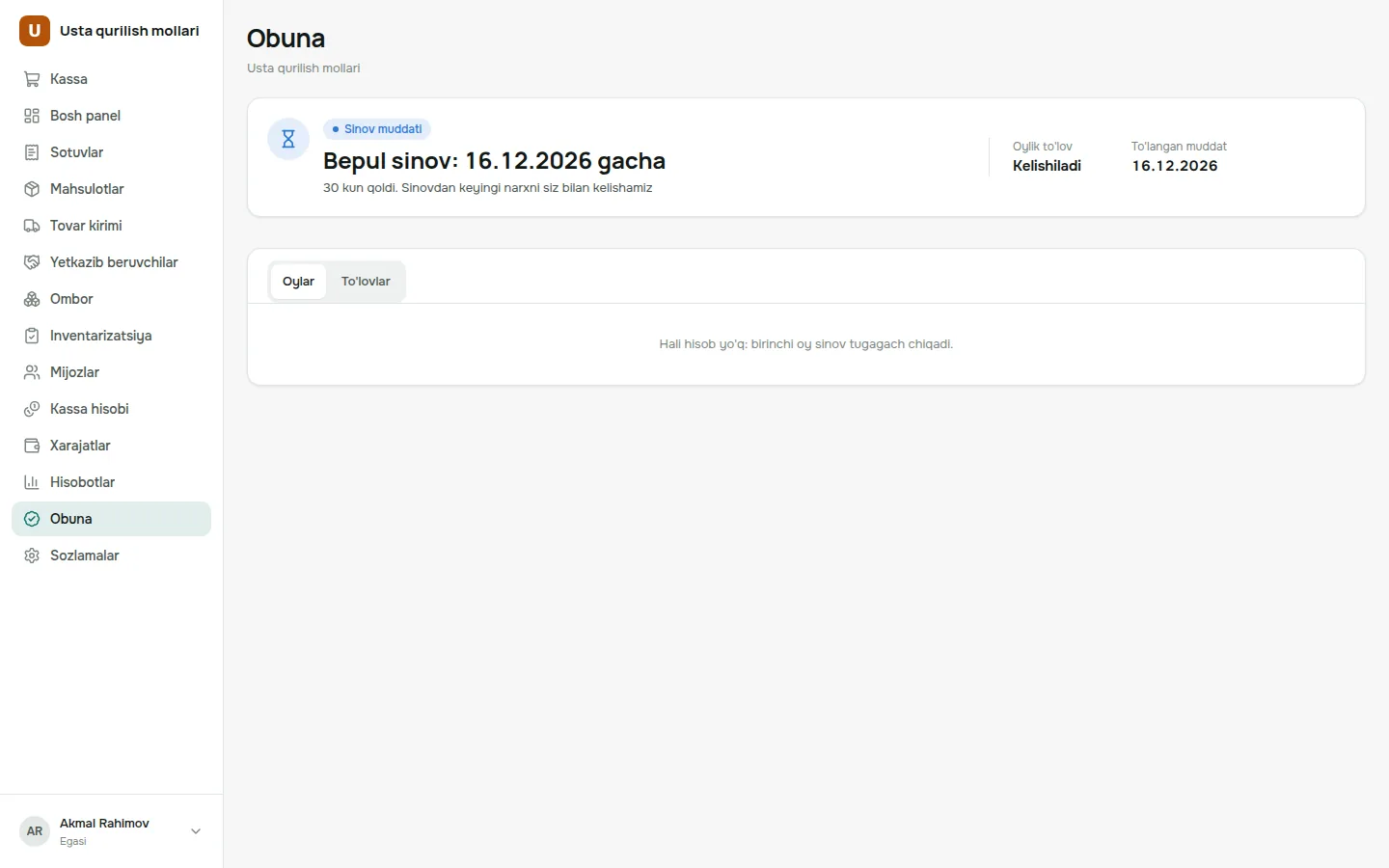
Status
Section titled “Status”The top of the page shows your subscription status:
| Status | What it means |
|---|---|
| Sinov muddati (Trial) | Free trial. Shows until which date, and how many days are left. |
| Faol (Active) | Paid. Shows until which date it is paid and the next payment date. |
| To'lov kuni (Payment due) | Time to pay. Shows the amount and the date to pay by. |
| Muddati o'tgan (Overdue) | The payment is late. Shows the amount and how many days late. |
| To'xtatilgan (Suspended) | The subscription is suspended: the app does not work until payment is confirmed. |
| Bepul (Free) | No subscription fee for this shop. |
Below it: Oylik to'lov (Monthly fee) and the payment day, To'langan muddat (Paid until), Oldindan to'langan (Paid ahead: if you paid extra, how many months it covers).
How to pay
Section titled “How to pay”The Qanday to'lash (How to pay) block shows the amount and the ways to pay: the Karta raqami (Card number) and the card holder's name, and sometimes Click orqali to'lash (Pay with Click) or Payme orqali to'lash (Pay with Payme) buttons.
-
Press the copy icon next to the card number and send the money from your bank app (or press the Click / Payme button).
-
Once the money is sent, press To'ladim (I have paid) on the Obuna page.
-
Fill in the To'lovni bildirish (Report a payment) window:
- To'langan summa (Amount paid);
- To'lov sanasi (Payment date);
- Qanday to'ladingiz (How you paid): Karta o'tkazma (Card transfer), Click, Payme or Naqd (Cash);
- Izoh (Note): for example "from Ahmadjon's card, last 4 digits 1234";
- Chek yoki skrinshot (Receipt or screenshot): optional, but it makes checking faster.
-
Press Yuborish (Send).
We check that the money arrived and confirm the payment. If the payment day has come or passed, the page says "To'lovingiz tekshirilmoqda" (Your payment is being checked) while we check it. Once confirmed, the payment shows in the history. If Telegram is connected, a receipt also comes to Telegram.
Payments you reported
Section titled “Payments you reported”The payments you reported with To'ladim are in the Yuborilgan to'lovlar (Reported payments) list:
- Tekshirilmoqda (Being checked): not checked yet. If you sent it by mistake, press the × next to it and confirm Qaytarib olish (Take back).
- Topilmadi (Not found): the money was not found. The reason is written there. Check your payment and report it again, or contact us.
Accepted payments move from this list to the To'lovlar (Payments) history.
Telegram reminders
Section titled “Telegram reminders”You can get payment-day reminders and receipts in Telegram. If this block is on the page:
-
In the Telegram eslatmalar (Telegram reminders) block, press Telegramni ulash (Connect Telegram).
-
Telegram opens. Press Start there.
-
Come back to the page: you will see the chat connected.
You can connect several chats (Yana bir chatni ulash, Connect another chat), for example your own and your accountant's. To remove a chat, press Uzish (Disconnect).
Payment history
Section titled “Payment history”The bottom of the page has two tabs:
- Oylar (Months): every month and its state: paid, To'lash kerak (To pay), Kechikkan (Late), Kechildi (Waived) or partly paid.
- To'lovlar (Payments): every accepted payment and which months it covers. The printer icon prints a To'lov tasdig'i (Payment confirmation) on an A4 sheet.
Reminder banners
Section titled “Reminder banners”As a payment comes up, the owner sees a banner at the top of the pages (not on the Kassa, Till, screen):
- when 7 days or fewer of the free trial are left;
- when the next payment day is near;
- when the payment day has come (with a To'lash, Pay, button);
- when the payment is late (this banner cannot be closed);
- when the payment day has come or passed and a payment you reported is still being checked ("To'lovingiz tekshirilmoqda").
The other banners can be closed for today with their × icon. They show again the next day.
If the subscription is suspended
Section titled “If the subscription is suspended”If a payment is long overdue, the subscription may be suspended. Then:
- All staff see an Obuna to'xtatilgan (Subscription suspended) screen instead of the app. Cashiers and managers are asked to contact the shop owner.
- The owner opens the Obuna page with the To'lash button, pays and reports it with To'ladim.
- As soon as payment of everything owed is confirmed, the app works again.
- Your data is not deleted.
Questions
Section titled “Questions”How much is the subscription? The price is agreed with each shop and shows on the Obuna page in the Oylik to'lov line.
I transferred the money but it still says "To'lov kuni". Check that you pressed To'ladim and reported the payment. The status changes after we see the money and confirm it.
Can the manager pay the subscription? No, only the owner sees the Obuna page. If the shop has a second owner, they can pay too.
I need a document for the payment. In To'lovlar, press the printer icon and print the To'lov tasdig'i.