Box and piece
Many goods arrive in boxes but are also sold one by one: 1 box = 24 pieces. You do not need two products for this. Add one product with the unit dona (piece) and add a box to it. Stock is always kept in pieces; the box just means "24 pieces at once".
Example
Section titled “Example”Sparkling water 0.5 l:
- 1 piece: 5 000 so'm;
- 1 box: 24 pieces inside, box price 110 000 so'm (bought one by one it would be 120 000);
- the shop has 10 boxes and 5 pieces: stock is 245 pieces.
If a customer takes 1 box and 3 pieces, 24 + 3 = 27 pieces come off stock and 218 pieces remain.
Adding the box
Section titled “Adding the box”-
Open the product (or Yangi mahsulot, New product). Its unit should be dona.
-
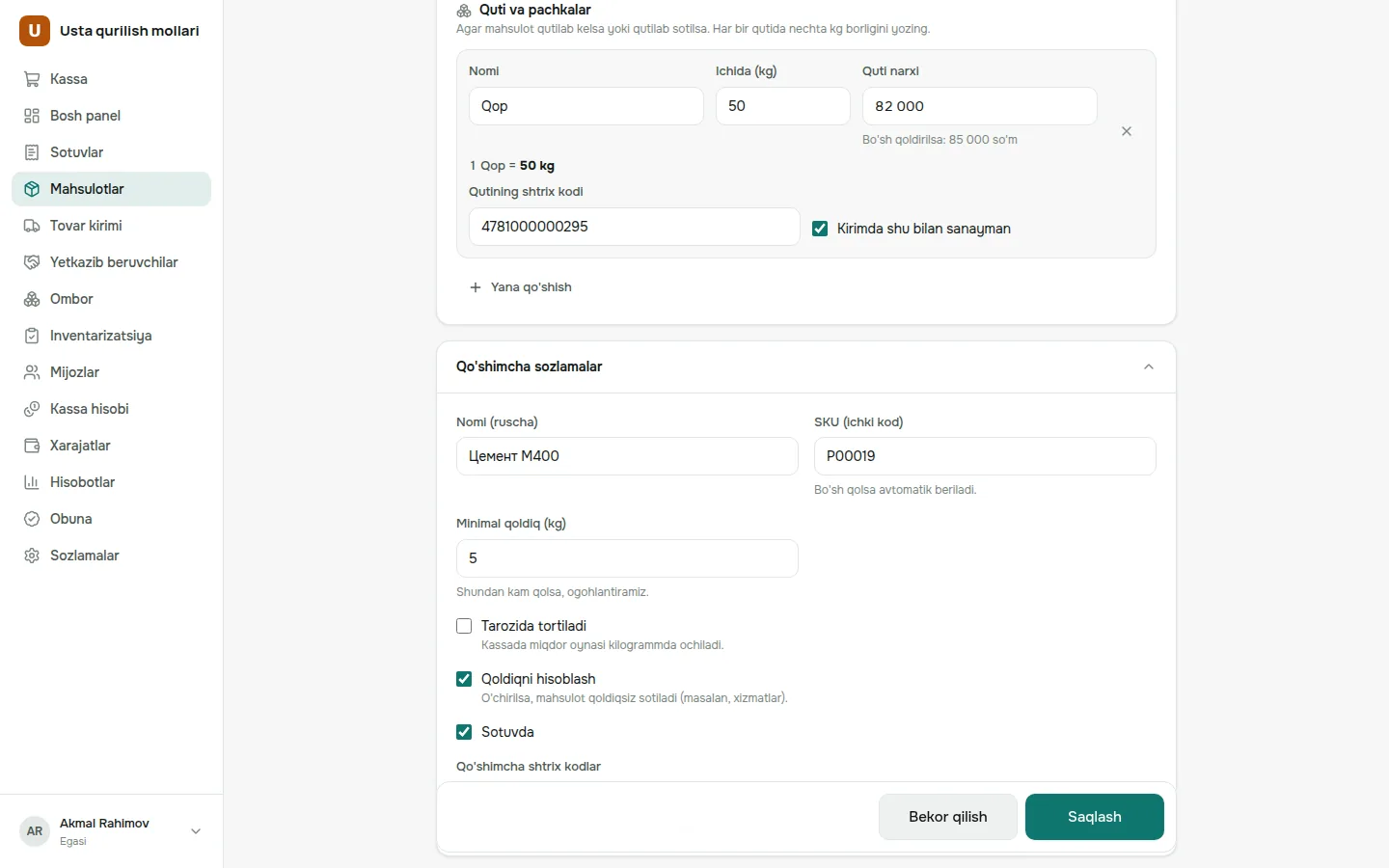
Under Quti va pachkalar (Boxes and packs) tap Quti (Box). For another name tap Blok, Pachka (Pack) or Qop (Sack), or change it in the Nomi (Name) field.
-
Ichida (dona) (Inside, pieces): how many pieces the box holds, for example
24. Underneath it reads 1 Quti = 24 dona. -
Quti narxi (Box price): the box's own price. If you leave it empty, the box sells at the price of its pieces: the field shows Bo'sh qoldirilsa: 120 000 so'm (If left empty: 120 000 so'm). If the box sells for less, type
110 000. -
Qutining shtrix kodi (Box barcode): scan the code on the box. It differs from the single item's code. If there is none, leave it empty.
-
Kirimda shu bilan sanayman (I count in this when receiving): when on, goods receiving counts this product in boxes straight away. It is already on for the first pack you add. If the supplier delivers single pieces, switch it off.
-
For another pack (for example Blok with 6 inside), tap Yana qo'shish (Add another).
-
Saqlash (Save).
At the till
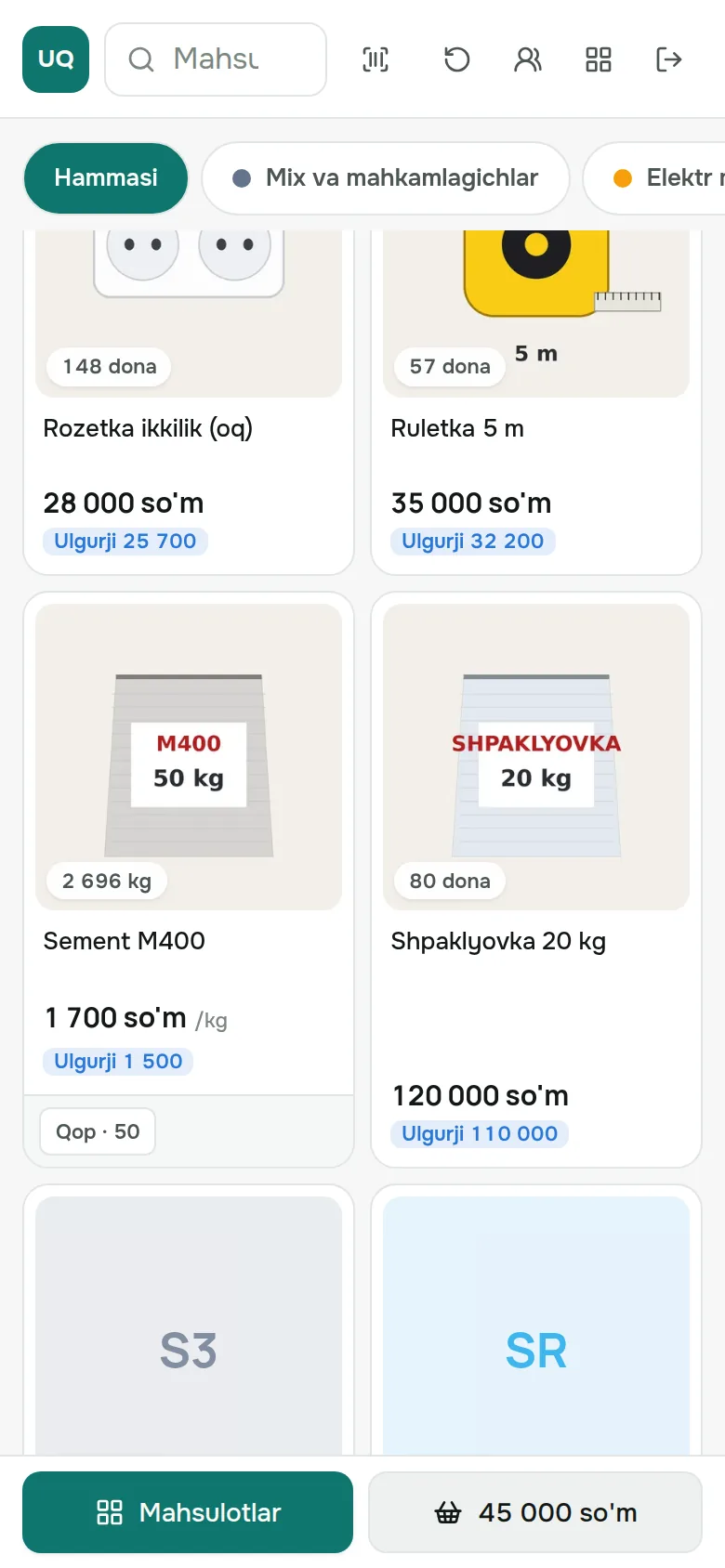
Section titled “At the till”- Under the product's button sit its pack buttons: Quti · 24. A tap adds 1 box to the basket.
- Scanning the box barcode also adds 1 box.
- Tapping the product itself or scanning the single item's code adds 1 piece.
- A box line in the basket counts boxes: 2 boxes, 3 boxes. Boxes sell in whole numbers only.
When receiving goods
Section titled “When receiving goods”Every line of a goods receipt has Nimada sanaysiz (What do you count in): dona or Quti (24 dona). Pick the box, type 10, and = 240 dona shows under the line, with the price as Narxi (1 Quti) (Price per box). 240 pieces are added to stock and the cost is worked out per piece. See Goods receiving.
Works with other units too
Section titled “Works with other units too”A pack is not only for pieces:
| Product | Unit | Pack |
|---|---|---|
| Sugar | kg | Qop (sack), 50 kg inside |
| Nails 120 | kg | Quti (box), 25 kg inside |
| Cable VVG 3×2.5 | metr | Bobina (reel), 100 metres inside |
| Perfume (decants) | ml | Butun flakon (whole bottle), 100 ml inside |
| Cigarettes | pachka | Blok, 10 packs inside |
Selling a sack takes 50 kg off stock; a reel takes 100 metres.
On wholesale prices
Section titled “On wholesale prices”If the product has a wholesale price, a box on a wholesale sale costs wholesale price × pieces in the box: the Quti narxi field is not used then. A product without a wholesale price sells its box at the retail box price on a wholesale sale too.
Questions
Section titled “Questions”I only sell whole boxes, I never open them. Then make the product's unit quti (box) and add no pack. Stock is kept in boxes.
Can stock be shown in boxes? No, stock is always in the base unit: 245 pieces. Divide by 24 for boxes (10 boxes and 5 pieces).
Different suppliers' boxes hold different amounts (12 and 24). Add two packs, Quti 12 and Quti 24, each with its own barcode.
If I change how many a box holds, do old sales break? No. Every sale remembers the box size at the time. The new number only affects later sales.
Scanning the box says "no product with this barcode". The box's code is not on the product. Open the product, scan the code into Qutining shtrix kodi and save.