Prices
A product can have several prices. Most of them appear only when the matching feature is switched on in Sozlamalar (Settings) → Imkoniyatlar (Features).
| Price | What it is | When it shows |
|---|---|---|
| Sotuv narxi (Sale price) | The ordinary (retail) price at the till | Always |
| Tannarx (Cost) | What the goods cost you | Only to the owner and the manager |
| Ulgurji narx (Wholesale price) | The price for wholesale customers | When Ulgurji narx is on |
| Price in dollars | The price in dollars, its so'm worked out daily from the rate | When Dollar (USD) is on |
| Eng past narx (Lowest price) | Do not sell below this with a discount | When Narx nazorati (Price control) is on |
Every price is for one unit of the product: 1 piece, 1 kg, 1 metre. A box price is separate: Box and piece.
Sale price and cost
Section titled “Sale price and cost”The Sotuv narxi is what the till charges. Anyone who may add products can change it.
The Tannarx is what the goods cost you. Only the owner and the manager see it and can type it by hand on the product page: a cashier never sees cost or profit anywhere. But a cashier can also do goods receiving, and the prices they type on a receipt change the cost too, so a cashier must copy them exactly from the invoice.
You do not have to type the cost by hand. Every goods receipt recalculates it as an average. Example: 10 pieces in stock at 10 000 so'm, another 10 arrive at 12 000 so'm. The new cost: (10 × 10 000 + 10 × 12 000) / 20 = 11 000 so'm. If stock had dropped to zero, the cost becomes the last receipt's price.
Ustama (markup)
Section titled “Ustama (markup)”With both prices typed, Ustama shows under the sale price: how many percent were added to the cost. Bought at 100 000 and sold at 120 000: Ustama: 20%.
If the sale price is below the cost, a red warning appears: Sotuv narxi tannarxdan past: har sotuv zarar. (The sale price is below cost: every sale is a loss.) Saving is still allowed: it is your decision. Find such products with the Zararli narx (Loss price) filter in the list (Product list).
Wholesale price
Section titled “Wholesale price”For shops that sell both wholesale and retail.
-
Switch on Sozlamalar → Imkoniyatlar → Ulgurji narx → Mahsulotlarga ulgurji narx qo'shish (Add wholesale prices to products).
-
A Ulgurji narx (1 dona) field appears on products. Type the price. If you leave it empty, the product sells at its retail price on wholesale sales too.
-
Mark your wholesale customers: in Mijozlar (Customers) edit the customer and switch on Ulgurji mijoz (Wholesale customer). When this customer is picked at the till, prices switch to wholesale by themselves.
At the till, a Chakana narx / Ulgurji narx (Retail / Wholesale price) switch sits above the basket; the cashier can switch it by hand too. With Kassada ikkala narxni ko'rsatish (Show both prices at the till) on (it is on to begin with), product buttons show both prices so the seller can quote both. How it works at the till: Discounts and price control.
On a wholesale sale a box costs wholesale price × pieces in the box.
If the wholesale price is above retail or below cost, the product page warns you.
Prices in dollars
Section titled “Prices in dollars”For cosmetics, electronics, spare parts and other goods bought in dollars. You type the price in dollars, and the so'm price is worked out every day from the shop's rate.
-
Switch on Sozlamalar → Imkoniyatlar → Dollar (USD) → Dollar bilan savdo (Trade in dollars) and type today's rate (Dollar rate).
-
Dollar narxlarini yaxlitlash (Round dollar prices): what the so'm price is rounded to: 1, 100, 500 or 1 000 so'm. For example $1.75 × 12 850 = 22 487.5 so'm; rounded to 100 it sells at 22 500 so'm.
-
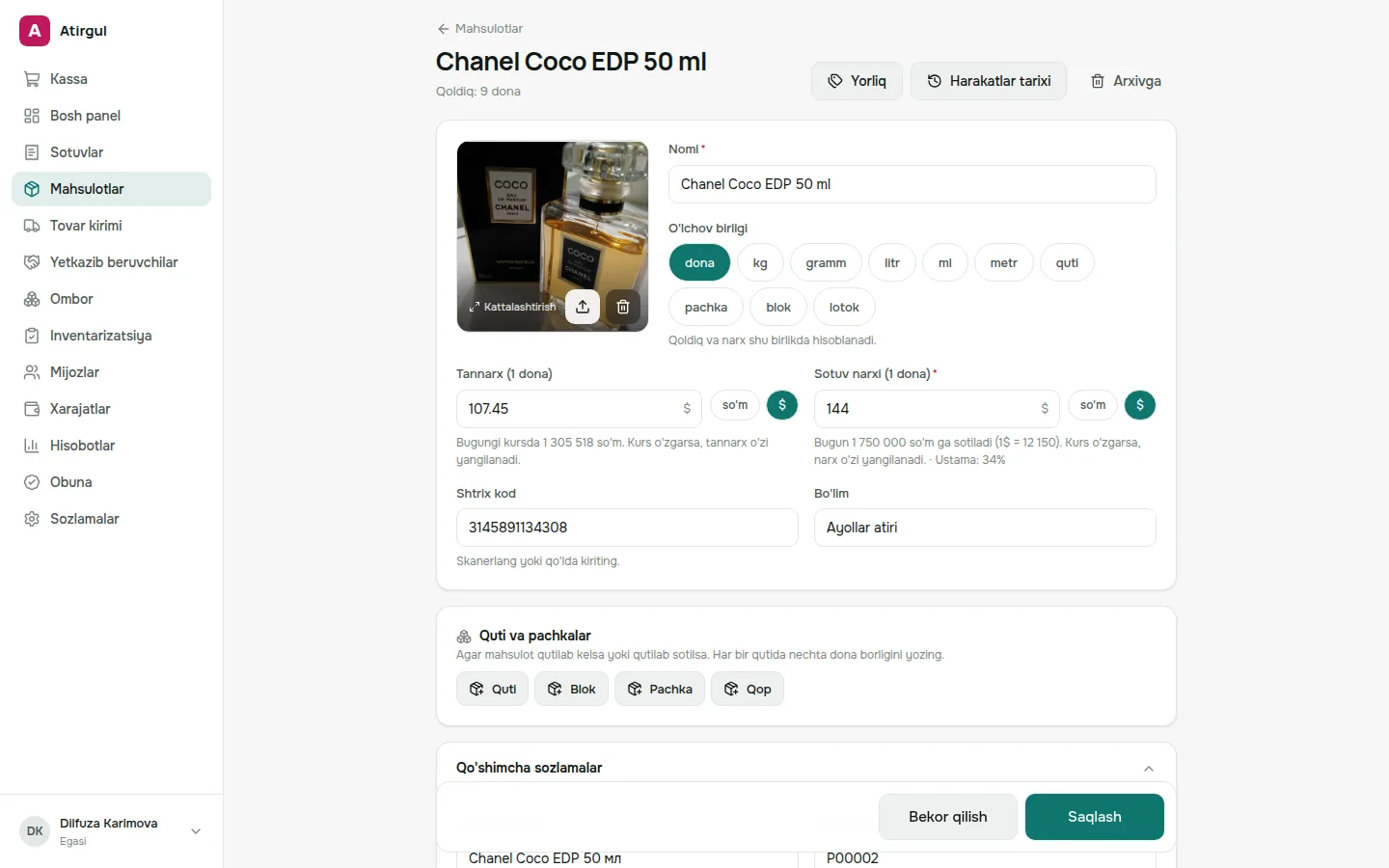
On the product page, pick $ on the so'm / $ switch next to the price and type the price with a dot:
12.50. For very cheap goods up to 4 places:0.042. -
Underneath you see Bugun 160 600 so'm ga sotiladi (1$ = 12 850) (Sells at 160 600 so'm today) (12.50 × 12 850 = 160 625, rounded to 100). Saqlash (Save).
- Every time a new rate is typed, the so'm prices of all dollar-priced products update by themselves. The till, receipts and reports always work in so'm.
- Cost and wholesale price can be in dollars too: each has its own so'm / $ switch.
- If you pick so'm and type a so'm price by hand, that price is cut loose from the dollar and no longer moves with the rate.
- If you switch from $ to so'm and back without typing anything, the dollar price you typed comes back exactly.
If a dollar-priced product has a box price typed, that box price stays in so'm and does not follow the rate. To let the box follow the rate, leave Quti narxi (Box price) empty.
Lowest price
Section titled “Lowest price”In a shop with Narx nazorati on, products show (to the owner and the manager) an Eng past narx (1 dona) field. If a cashier tries to sell below it with a discount, the app stops or warns them. The cashier does not see this price. The lowest price cannot be above the sale price.
With price control on, a discount may not take a line below:
- on a retail sale: the highest of the cost, the wholesale price (when the product has one) and the lowest price;
- on a wholesale sale: the cost.
Only a discount is checked: if the shelf price itself is below the cost, the product sells at that price (the Zararli narx (Priced at a loss) filter lists such products).
Price control itself (warn or block, the largest discount percent) is set in Features; how it works at the till: Discounts and price control.
Changing a price
Section titled “Changing a price”Open the product, change the price, Saqlash. The new price reaches every till by itself.
- Old sales do not change: every receipt keeps the price of its day.
- Update the shelf labels: tick the changed products in the list and print again with Yorliq (Label) (Labels).
Questions
Section titled “Questions”Why is the markup 20% and not 17%? Markup is on cost: bought at 100 and sold at 120, 20% was added to the cost. 17% would be relative to the sale price; the app does not use that.
The cost changed by itself. After a goods receipt the cost becomes the average of the old and new prices. That is right: profit is worked out from what the goods really cost. A cost in dollars also moves with the rate.
Can I raise every price by 10% at once? There is no such button at the moment: you change the price on each product. Dollar prices, though, all change at once when a new rate is typed.
There is no wholesale price field. Mahsulotlarga ulgurji narx qo'shish is not switched on in Sozlamalar → Imkoniyatlar.
What happens to a dollar price if no rate has been typed? The product page says Avval bugungi dollar kursini kiriting: shundan keyin so'mdagi narx hisoblanadi. (Type today's dollar rate first: then the so'm price is worked out.) Type the rate first, then the dollar price.
One product's markup suddenly jumped to 275%. Probably promotional goods were received at price 0: free pieces lower the average cost, so the markup rises. The sale price does not change; the markup shows what the goods really cost.