Scales
Rice, sugar, fruit, sausage and the like are sold by weight. There are two ways:
- An ordinary scale. The seller weighs and types the weight into the till.
- A label-printing scale. The scale weighs and prints a label with a barcode. The till scans the label and the product goes into the basket with its weight.
Either way the product's unit is kg and the price is per 1 kg.
With an ordinary scale
Section titled “With an ordinary scale”-
Add the product: unit kg, Sotuv narxi (1 kg) (Sale price per kg), for example
14 000. Choosing kg switches Tarozida tortiladi (Weighed on a scale) on by itself. -
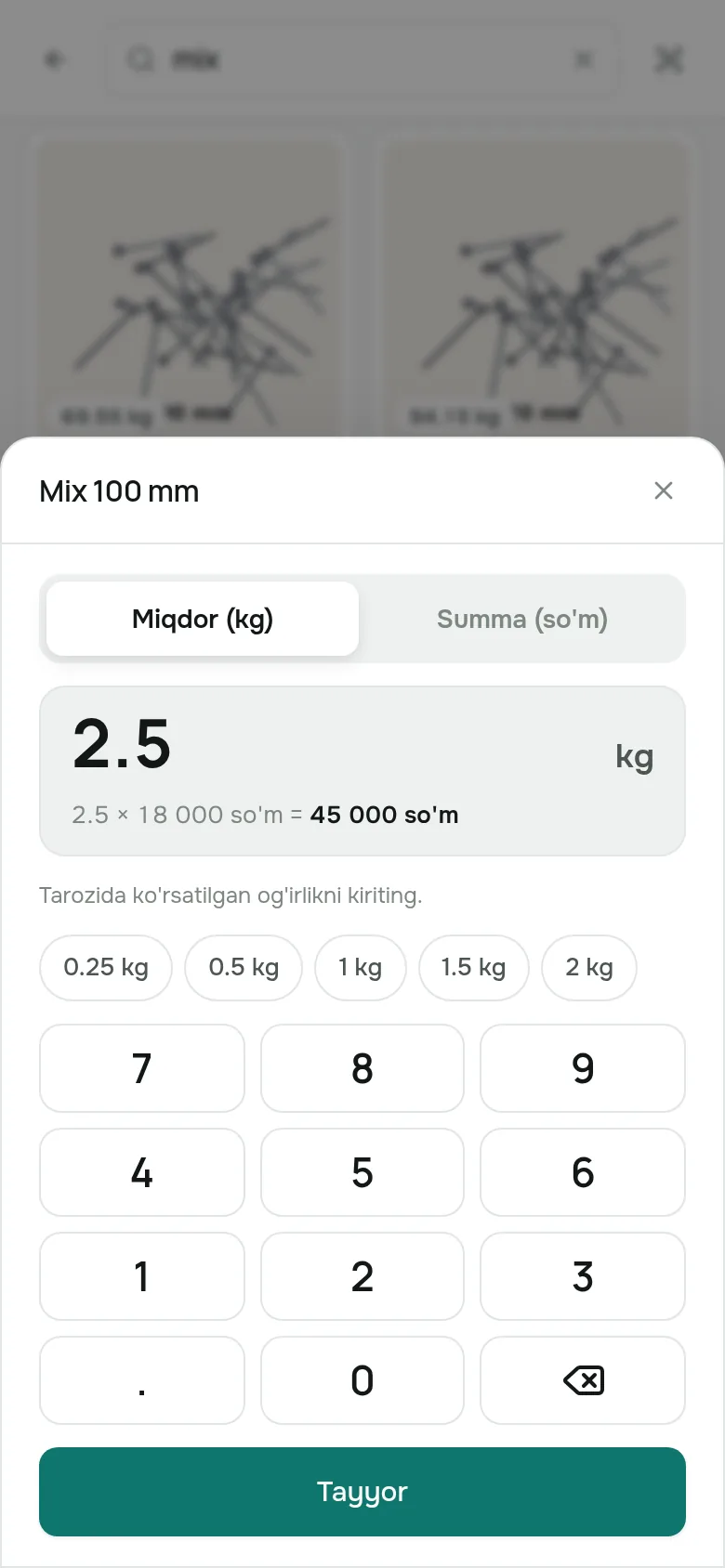
At the till tap or scan the product. The quantity sheet opens: Tarozida ko'rsatilgan og'irlikni kiriting. (Type the weight shown on the scale.)
-
Type the weight from the scale (
1.25) or tap a quick amount (0.25, 0.5, 1, 1.5, 2). The amount shows at once: 1.25 × 14 000 = 17 500 so'm. -
Tayyor (Done).
When a customer asks for "10 000 so'm worth", choose Summa (so'm): the app says how much to weigh. See Units of measure.
With a label-printing scale
Section titled “With a label-printing scale”How a scale barcode is built
Section titled “How a scale barcode is built”The barcode a scale prints has 13 digits. Example: 2100042012509
| Digits | In the example | Meaning |
|---|---|---|
| 1-2 | 21 |
Scale marker: 20 to 29 |
| 3-7 | 00042 |
Product code (PLU): the number you gave this product in the scale |
| 8-12 | 01250 |
Weight in grams: 1250 g = 1.250 kg |
| 13 | 9 |
Check digit |
The app finds the product by its PLU and puts the weight into the basket.
Setting it up
Section titled “Setting it up”-
In the scale's own software give every item a number (PLU), for example Guruch Lazer =
42. -
In our app open the product. Its unit must be kg.
-
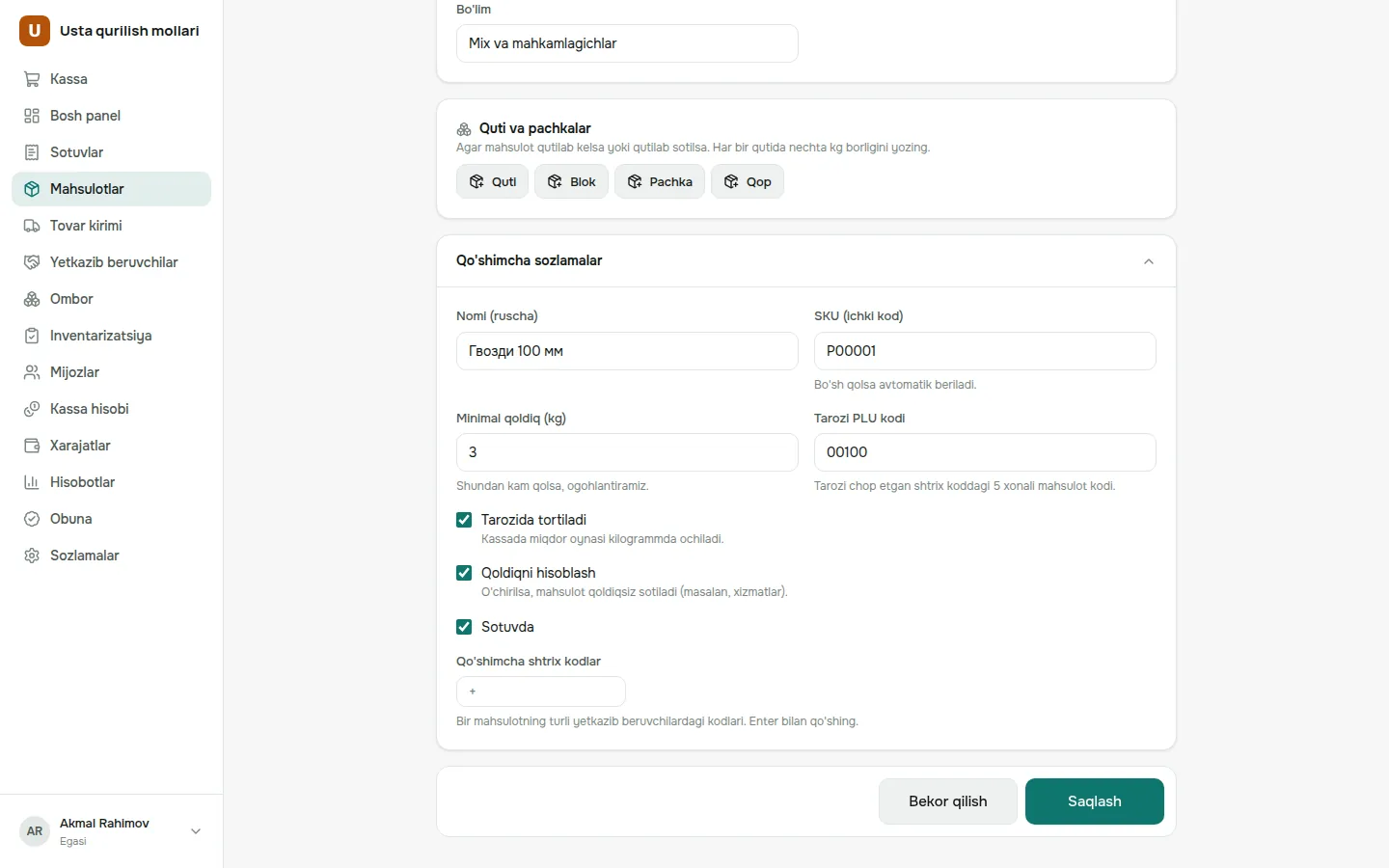
Open Qo'shimcha sozlamalar (More settings). Tarozida tortiladi (Weighed on a scale) must be on (picking kg as the unit turns it on): then the Tarozi PLU kodi (Scale PLU code) field appears.
-
Type the scale's number:
42. The app makes it00042itself. Up to 5 digits;00000is not allowed. -
Saqlash (Save). Now scan a scale label at the till: Guruch Lazer, 1.250 kg goes into the basket.
- A PLU can be on only one product that is on sale. If you type a PLU another product has, saving fails and the message says which product has it.
- The till takes the price from our app. The price on the scale only appears on its label. When a price changes, change it in both places, or the label and the receipt will differ.
- A code with a wrong check digit (a badly printed label) is not read: the wrong item can never be sold. Print the label again.
- One label holds at most 99.999 kg.
Questions
Section titled “Questions”Scanning a scale label says "Bunday shtrix kodli mahsulot yo'q" (No product with this barcode).
Check: is the Tarozi PLU kodi on the product, and does it match the number in the scale; does the code start with 20–29; does the scale print the weight (not the price).
The weight comes out 1000 times too small. The product's unit is gramm. Make it kg. If the product already has sales, its unit cannot be changed: create a new product.
I have no such scale, but I sell by kg. No problem: type the weight at the till by hand. No PLU needed.
We also have ready 1 kg packs. Make them a separate dona (piece) product with their factory code, or add a Pachka pack holding 1 kg to the kg product (Box and piece).
Must the scale connect to the till computer? No. The scale only prints labels; the till reads them with a scanner.