Suppliers
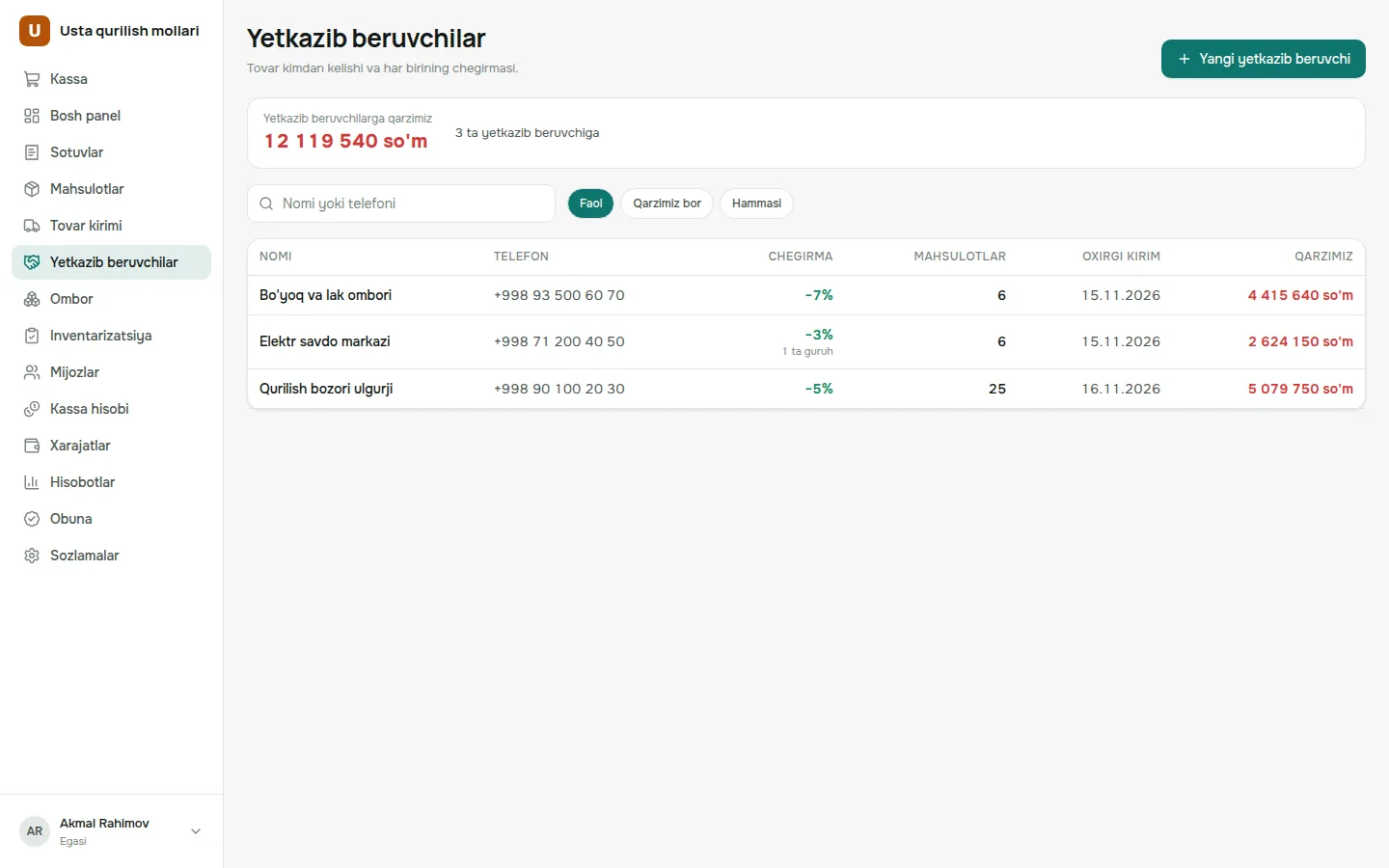
The Yetkazib beruvchilar (Suppliers) page holds the firms and people you buy from. In the plain setup it is just a list: on a goods receipt you pick who delivered. Two features make it do more:
- Yetkazib beruvchi chegirmasi (Supplier discount): the supplier's standing discount (for example 10%) comes off every receipt by itself and goes into the cost correctly;
- Yetkazib beruvchilar bilan hisob-kitob (Supplier accounts): every receipt is owed to the supplier, and payments reduce it.
Both are switched on in Sozlamalar (Settings) → Imkoniyatlar (Features). The owner and the manager work with suppliers.
Adding a supplier
Section titled “Adding a supplier”-
In the menu: Yetkazib beruvchilar → Yangi yetkazib beruvchi (New supplier). (The + next to the supplier on a goods receipt does the same.)
-
Nomi (Name):
Elektr ulgurji. Telefon (Phone). -
Chegirma (Discount, when the discount feature is on): the percent this supplier always gives, for example
10. -
Izoh (Note): address, the sales rep's name.
-
Qarz va to'lovlarni yuritish (Keep debts and payments, when accounts are on): leave it on for a real seller.
-
Saqlash (Save).
The list has Faol (Active), Qarzimiz bor (We owe; when accounts are on) and Hammasi (All) buttons. The number in the Mahsulotlar (Products) column opens that supplier's products.
For a supplier you no longer use, edit it and switch Faol off: it can no longer be picked on receipts, and its history stays.
Assigning to products
Section titled “Assigning to products”A product's "usual" supplier matters for discounts and debts. The product page has a Yetkazib beruvchi field (it appears only when one of the features above is on): Odatda kimdan olinadi. (Who it usually comes from.)
For many products at once:
-
Tick the products in the Mahsulotlar list (for example after searching
rozetka). -
Tap Yetkazib beruvchi (N), pick the supplier (and its group if needed).
-
Saqlash.
Or open the supplier and tap Tahrirlash (Edit): if products were received from it but are not assigned to it yet, it says Bu yetkazib beruvchidan kelgan N ta mahsulot hali unga biriktirilmagan (N products from this supplier are not assigned to it yet). Tap Biriktirish (Assign) and they all are.
Discounts
Section titled “Discounts”In household and building goods a supplier usually gives a standing discount off its price list: "list price 10 000, 10% off for you". The app takes this into account while you keep typing list prices.
Setting up
Section titled “Setting up”-
Switch on Sozlamalar → Imkoniyatlar → Yetkazib beruvchi chegirmasi → Yetkazib beruvchilarga umumiy chegirma (A standing discount for suppliers).
-
Edit the supplier and type Chegirma:
10. -
Assign the products to it (above).
On the product page
Section titled “On the product page”On a product with a discounting supplier the cost field becomes Kelish narxi, chegirmasiz (1 dona) (Purchase price before discount). Type the list price: 10 000. The real cost shows underneath: Tannarx: 9 000 so'm (−10%). Markup and profit are worked out from 9 000.
On receipts
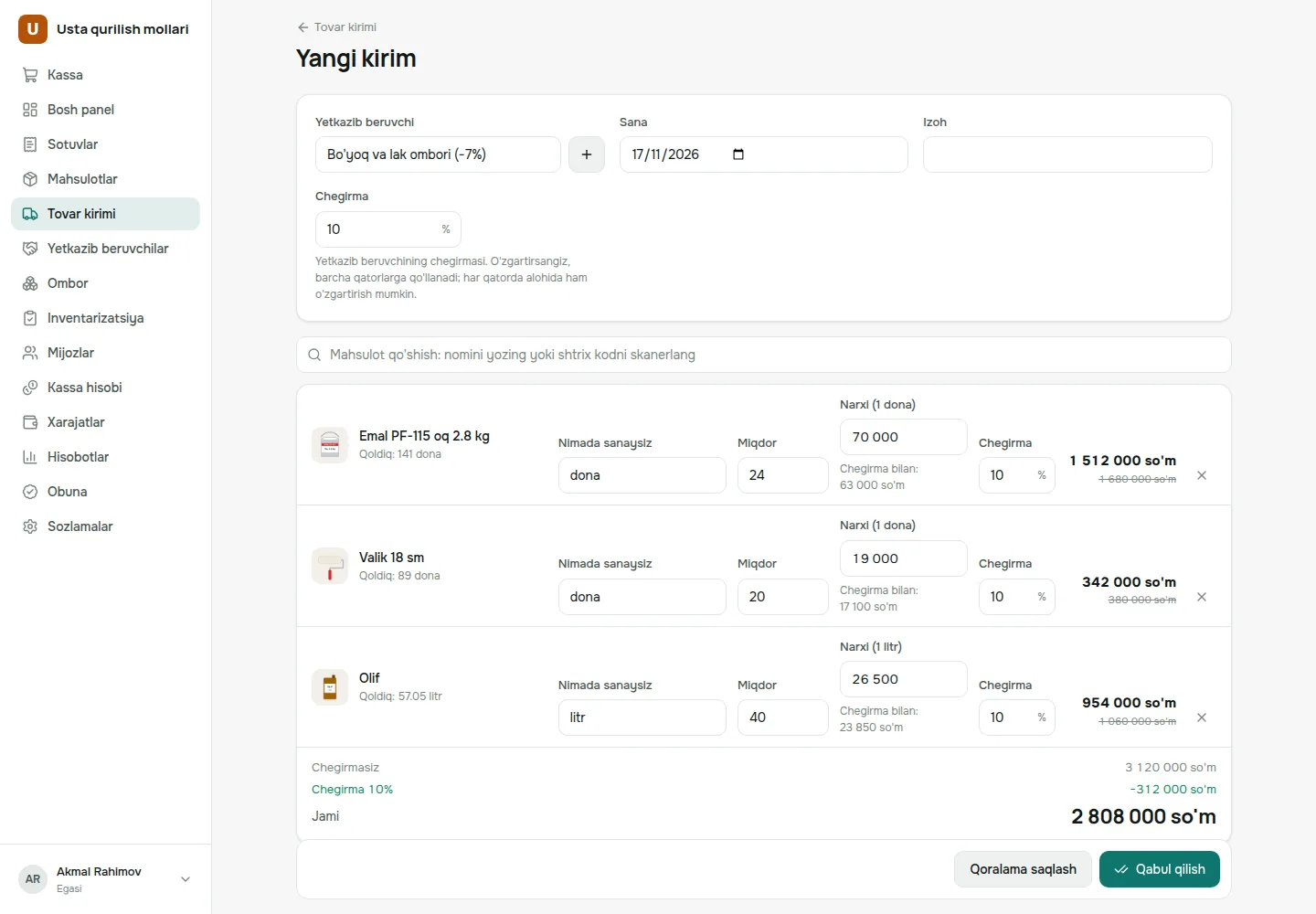
Section titled “On receipts”On a receipt from this supplier, 10% fills in the Chegirma at the top and comes off every line. You type the invoice's list prices; the totals show Chegirmasiz (Before discount), Chegirma 10% and Jami (Total). If this time the discount differs, change the percent at the top: it applies to every line. One line can be changed on its own too.
A discount never comes off twice: a cost that came from a discounted receipt already has the discount in it, and the app remembers that.
Discount groups
Section titled “Discount groups”Sometimes one supplier gives different discounts on different goods: 15% on sockets, 5% on cable. That is what discount groups are for.
-
Open the supplier's page. In Chegirma guruhlari (Discount groups) tap Yangi guruh (New group).
-
Nomi:
Rozetkalar(Sockets), Chegirma:15. Saqlash. -
Put products in the group: on the product page pick the group under the supplier, or tick several in the list and pick the group in Yetkazib beruvchi (N).
Products outside any group get the Asosiy (Main) discount. A group with products in it cannot be deleted: move the products to another group first.
When a discount changes
Section titled “When a discount changes”If you change the discount of a supplier (or group) that has products, the app asks: Tannarxlar nima bo'ladi? (What happens to costs?)
- Tannarxlarni qayta hisoblash (Recalculate costs): the assigned products' costs are recalculated with the new discount. The window shows the old and new cost on two products as an example.
- Faqat keyingi kirimlarga (Only future receipts): today's costs stay; the new discount applies from the next receipts.
When assigning products from the list in bulk, a Tannarxdan chegirmani ayirish (Take the discount off the cost) option appears: the new discount comes off hand-typed costs, and is not applied again to costs that came from discounted receipts.
Debts and payments
Section titled “Debts and payments”Setting up
Section titled “Setting up”-
Switch on Sozlamalar → Imkoniyatlar → Yetkazib beruvchilar bilan hisob-kitob → Yetkazib beruvchilarga qarzni yuritish (Keep supplier debts).
-
Enter what you owe today. Receipts from before the switch are not counted as debts. On each supplier's page: Tuzatish (Correction) → Qarzimiz ko'paydi (We owe more) → the amount, note Boshlang'ich qarz (Opening debt) → Saqlash.
-
For entries that are not real sellers (for example a "supplier" named Boshlang'ich qoldiq, opening stock), switch Qarz va to'lovlarni yuritish off: its receipts are never owed.
Every day
Section titled “Every day”- When a receipt is received, it is owed to the supplier. In the receive window you pick Qarzga (On credit), To'liq to'landi (Paid in full) or Qisman (Part) (Goods receiving).
- When you pay later: To'lov qilish (Make a payment) on the supplier's page. Amount, Naqd / Karta / O'tkazma (Cash / Card / Transfer), date and note. With Kassa nazorati (Cash control) on and the money taken from the drawer, leave Kassadan berildi (Paid from the drawer) on.
- You can also pay from a receipt's page: the payment then goes to that receipt. Otherwise a payment settles the oldest debts first.
- Pay more than you owe and the rest stays as an avans (advance) and counts towards the next receipts.
Each receipt shows its status: To'langan (Paid), Qisman to'langan (Part paid) or Qarz (Owed), and how much is left.
Debts in dollars
Section titled “Debts in dollars”A receipt received in dollars is owed in dollars (Dollar qarz, dollar debt), separately from the so'm debt (So'm qarz). The payment window asks Qaysi qarz (Which debt) and Nimada to'landi (Paid in): pay a dollar debt in so'm and you type the Kurs (1$) (Rate) and see how much of the debt it settles.
The supplier's page
Section titled “The supplier's page”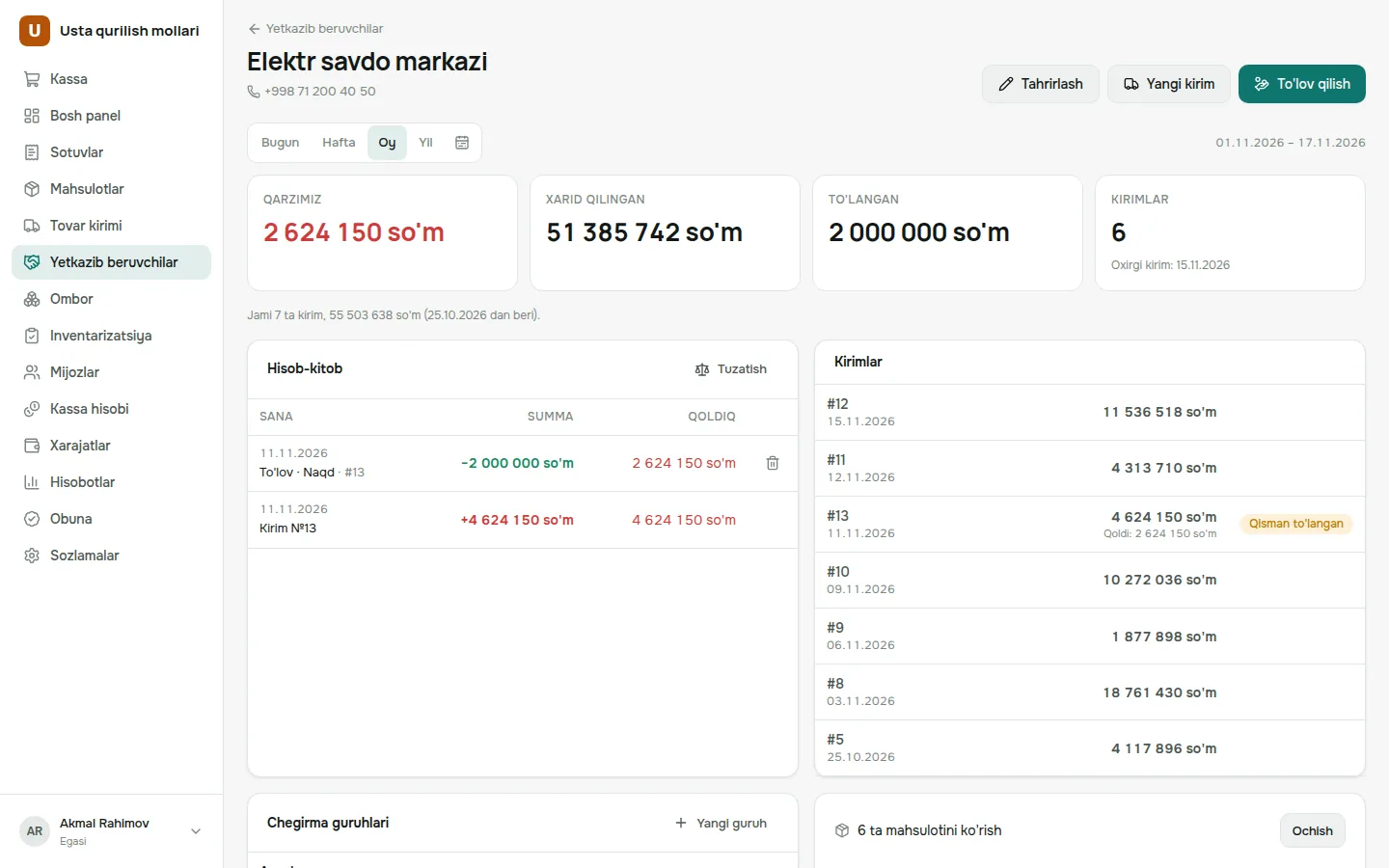
- Pick a period (today, week, month...). The tiles show Qarzimiz (We owe), Xarid qilingan (Purchased), To'langan (Paid) and the number of Kirimlar (Receipts).
- Hisob-kitob (Account): every receipt, payment and correction, each with the balance after it.
- Kirimlar: every receipt from this supplier and its payment status.
- At the top: Tahrirlash (Edit), Yangi kirim (New receipt) and To'lov qilish buttons.
The top of the Yetkazib beruvchilar list shows the total: Yetkazib beruvchilarga qarzimiz (What we owe suppliers) and to how many.
Questions
Section titled “Questions”The receipt total is 10% below the invoice.
The supplier has a discount and it comes off every line. If there is no discount this time, set the receipt's Chegirma to 0.
The cost is lower than what I typed. A discounting supplier is assigned to the product: what you typed is the "purchase price before discount", and the cost is that less the discount. Look at the Tannarx: ... line underneath.
I recorded a wrong payment. On the supplier's page, in Hisob-kitob, tap the delete icon on the payment's row and confirm O'chirish (Delete). Then record the right one. A receipt cannot be removed from the account.
Does the cashier see suppliers? No. When receiving, a cashier only picks the supplier. Discounts, debts and payments are seen by the owner and the manager.
Is a payment to a supplier an expense? No. Paying for goods is not an expense: the goods' cost comes off profit when they are sold.